

How to Create a Digital Product with AI: The Complete Idea-to-Income Workflow
Creating a digital product is no longer limited to professional writers, designers, programmers or established businesses.
With artificial intelligence tools such as ChatGPT, beginners can research customer problems, generate product ideas, create outlines, write content, develop templates, prepare marketing materials and launch digital products much faster than before.
However, AI does not automatically make a digital product valuable.
The most successful digital products are not simply generated and uploaded. They follow a deliberate workflow:
Problem → Research → Validation → Creation → Packaging → Pricing → Publishing → Marketing → Improvement
This guide explains how to create a valuable digital product with AI, upload it to a global digital marketplace such as Vezill and turn it into a product that can generate passive income through repeated online sales.
What Is a Digital Product?
A digital product is a product that customers can purchase, download, access or use electronically.
Unlike physical products, digital products do not require a warehouse, packaging, physical inventory or delivery vehicles. Once created, the same product can normally be sold repeatedly without manufacturing another copy.
Examples of digital products include:
Vezill currently allows creators to upload products including eBooks, PDFs, courses, videos, audio files, templates, software and educational materials.
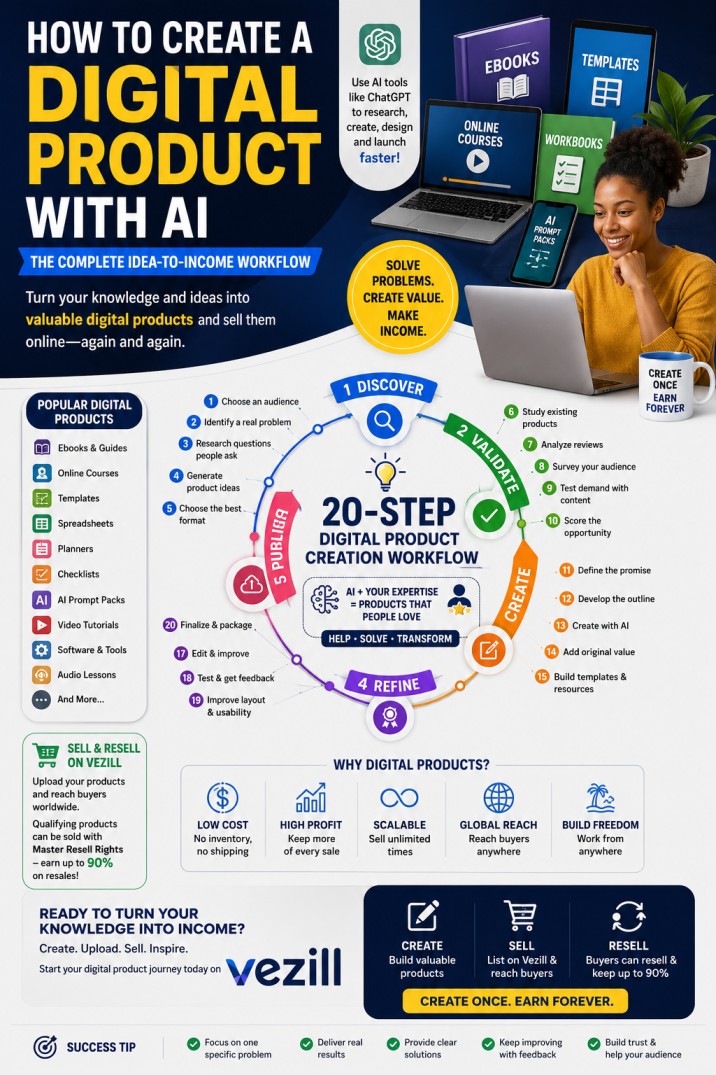
The Complete Digital Product Creation Workflow
Step 1: Start With a Problem, Not a Product
One of the biggest digital product creation mistakes is beginning with:
“What product should I create?”
A more useful question is:
“What problem are people actively trying to solve?”
People rarely buy a PDF, video or spreadsheet simply because it looks attractive. They buy the result they expect the product to help them achieve.
For example:
|
Audience |
Problem |
Possible Digital Product |
|
Jobseekers |
They do not get interview invitations |
CV and interview success toolkit |
|
Students |
They struggle to revise effectively |
Exam revision guide and practice questions |
|
Small businesses |
They cannot track income and expenses |
Business finance spreadsheet |
|
Farmers |
They do not know how to manage crop diseases |
Crop disease identification guide |
|
Content creators |
They run out of content ideas |
365-day social media content planner |
|
Authors |
Their eBooks are not selling |
eBook marketing blueprint |
|
Teachers |
Lesson preparation consumes too much time |
Editable lesson plan templates |
|
Freelancers |
They struggle to find clients |
Freelance client acquisition toolkit |
A strong digital product solves one specific problem for one identifiable group of people.
Questions to ask
Step 2: Use AI to Generate Digital Product Ideas
AI Tools such as ChatGPT can help you turn your knowledge, profession, experience or interests into possible digital products.
Use a prompt such as:
I have experience in [your experience or skill]. Identify 20 problems faced by [target audience] that I could solve with an eBook, template, course, checklist, spreadsheet or practical guide. Rank the ideas according to urgency, ease of creation and commercial demand.
You can also ask:
Suggest digital products I can create for [audience]. For each idea, provide the customer problem, expected result, recommended format, possible price and key selling point.
Do not select an idea only because AI recommends it. Treat AI-generated ideas as starting points that must still be validated using real market evidence.
Characteristics of a promising product idea
A good digital product idea should be:
Step 3: Research What People Are Asking ChatGPT and Google
Modern customers no longer search using keywords alone. They ask full conversational questions such as:
These conversational queries reveal the customer’s concerns, level of experience and desired outcome.
Search behaviour is also moving toward conversational product discovery, where users describe their needs, ask follow-up questions and expect relevant recommendations rather than only receiving a list of webpages. Research on conversational product search shows that effective systems increasingly interpret user needs, product information and clarifying questions together.
Where to conduct market research
Use a combination of:
Record the exact wording people use. Those questions should influence your title, product content, sales description and frequently asked questions.
Step 4: Validate the Product Before Creating It
Validation means collecting evidence that people want the proposed solution before spending days or weeks creating it.
A simple digital product validation scorecard that help you create a winning product
Score each area from 1 to 5.
|
Validation Factor |
Question |
|
Problem frequency |
Do people experience this problem regularly? |
|
Urgency |
Do they want an immediate solution? |
|
Search demand |
Are people searching or asking about it? |
|
Existing purchases |
Are similar products already being sold? |
|
Audience access |
Can you reach the target customers? |
|
Clear outcome |
Can the result be described in one sentence? |
|
Creation ability |
Can you produce a credible solution? |
|
Differentiation |
Can your version be clearer, faster or more useful? |
An idea scoring highly across these areas is usually more promising than an idea based only on personal interest.
Practical validation methods
1. Review competing products
Study similar products and identify:
2. Ask your audience
Create a poll or short survey asking:
3. Publish educational content
Share posts, short videos or articles about the problem. Measure:
Strong engagement can indicate demand.
4. Create a minimum viable product
Instead of creating a 300-page eBook immediately, start with:
You can improve and expand the product after receiving customer feedback.
Step 5: Define the Product Promise
Your product promise explains the transformation customers should expect.
Use this formula:
This product helps [specific audience] achieve [specific result] without [major difficulty].
Examples:
Avoid unrealistic promises such as guaranteed income, instant success or effortless results.
Your promise should be attractive but credible.
Step 6: Choose the Best Digital Product Format
The product format should match the problem.
Use an eBook or PDF guide when:
Use a video course when:
Use a template when:
Use a spreadsheet when:
Use a prompt pack when:
Use a bundle when:
A single file cannot provide the complete solution.
For example, a business start-up bundle could contain:
Step 7: Create a Detailed Product Outline
Do not ask ChatGPT to write an entire eBook or course using a one-line prompt.
Create a structured outline first.
A strong outline should move the customer from their current problem to the intended result.
Example structure for a practical digital guide
AI prompt for creating an outline
Act as an experienced instructional designer and subject-matter expert. Create a detailed outline for a digital product titled “[title].” The product is for [audience] and should help them achieve [result]. Include chapters, subtopics, practical exercises, examples, templates, common mistakes and frequently asked questions. Arrange the content from beginner to implementation level.
Review the outline before generating the content.
Remove repetition, unsupported claims and sections that do not contribute to the product promise.
Step 8: Create the Product With AI Assistance
The use of AI Tools can accelerate production, but human expertise must guide the final product.
ChatGPT can help with:
Canva can help with:
Spreadsheet tools can help with:
Video tools can help with:
AI-assisted digital product creation commonly follows a process in which the creator uses AI to brainstorm, outline and generate initial assets before organising them into a complete offer.
Important quality rule
Never publish raw AI output without reviewing it.
Check:
AI can generate inaccurate information confidently. The creator remains responsible for the final product.
Step 9: Add Original Value
A generic AI-generated product is easy to copy and difficult to sell.
To make your product more valuable, add:
For example, instead of creating a general guide titled “How to Start Farming,” create:
“One-Acre Tomato Farming Business Plan for Kenyan Beginners: Budget, Production Calendar, Disease Management and Market Strategy.”
The second product is more specific, practical and commercially relevant.
Step 10: Edit and Quality-Control the Product
Before publishing, conduct at least four reviews.
Content review
Confirm that the product:
Accuracy review
Verify:
Language review
Correct:
User-experience review
Ask:
Where possible, allow several people from the target audience to test the product before launch.
Step 11: Package the Digital Product Professionally
Customers evaluate presentation before they evaluate content.
Your product package may include:
For a PDF or eBook, export a clean final PDF.
For a course, organise lessons in the correct order and ensure videos have clear sound.
For templates, include editable and example versions.
For spreadsheets, protect important formulas and include usage instructions.
Vezill advises creators to prepare a clear title, detailed description, professional cover or thumbnail, benefits, included materials, intended audience and reseller-rights information.
Step 12: Decide Whether to Add Resell Rights
Digital product creators can sell products under different licensing models.
Personal-use rights
The buyer can use the product but cannot resell, redistribute or claim ownership.
Commercial-use rights
The buyer can use the product within a business or to create certain commercial outputs, subject to the licence.
Private Label Rights
The buyer may receive permission to edit, rebrand or repurpose the product, depending on the specific licence.
The buyer receives permission to resell the product and may also be allowed to transfer reselling rights to subsequent buyers, depending on the licence terms.
Vezill uses a digital product trading model in which qualifying products can be sold with Master Resell Rights. According to its current reselling guide, eligible resellers can keep up to 90% of a resale, while creators benefit from original sales and continuing reseller activity.
Always state clearly:
Do not label a product PLR or MRR unless you own the content or have legal permission to grant those rights.
Step 13: Price the Digital Product
There is no single correct price for every digital product. However, it is important to price your digital product correctly to maximise sales and profits.
Price should reflect:
Common pricing approaches
Cost-based pricing
Estimate the cost and time required to create the product, then add a profit margin.
Competitor-based pricing
Compare similar products and position your offer below, within or above the market range.
Set the price according to the value of the result rather than the number of pages or files.
A spreadsheet that saves a business ten hours every month may be more valuable than a 200-page eBook.
Vezill’s current upload guide states that products should be assigned a clear selling price and identifies a minimum selling price of US$1 or its equivalent. Sellers should confirm the current platform requirements before uploading.
Step 14: Write an AI-Search-Optimised Product Title
Your title should immediately communicate:
Weak title
Business Guide
Better title
Small Business Finance Guide
Stronger title
Small Business Finance Toolkit: Income, Expense and Profit Tracking Templates for Beginners
Use language customers naturally type or ask.
Do not overload the title with unrelated keywords.
Product title formula
[Main result] + [target audience] + [product type or differentiator]
Examples:
Step 15: Write a Product Description That Answers Buyer Questions
A strong product description should answer:
Recommended product-page structure
Product headline
State the main result.
Problem introduction
Show that you understand the buyer’s challenge.
Product solution
Explain how the product helps.
What is included
List files, chapters, lessons, templates and bonuses.
Who it is for
Identify suitable buyers.
Benefits
Explain practical outcomes.
How it works
Describe access, download and implementation.
Rights and licence
Clarify usage and resale permissions.
Frequently asked questions
Address objections before purchase.
Call to action
Tell the visitor what to do next.
Step 16: Upload the Product to Vezill
Vezill provides a creator workflow through its Start Selling area.
The current upload process includes:
The platform’s current guide notes support for documents such as PDFs, Images, video content and script files, with creators encouraged to explain benefits, intended users, included materials and Master Resell Rights where applicable.
Vezill is differentiated from conventional upload-only marketplaces by combining original product creation with digital product reselling. Creators can sell their own products, while buyers of eligible MRR products can become resellers.
Step 17: Create a Launch Plan
Uploading a product does not guarantee sales.
A basic launch should include:
Pre-launch
Launch period
Post-launch
Step 18: Market the Product Using Problem-Based Content
Do not promote only by repeatedly saying:
Buy my product.
Create content that helps the audience recognise the problem and understand the solution.
Content categories
Educational content
Teach one useful idea from the product.
Mistake-based content
Explain common errors.
Comparison content
Compare methods, tools or strategies.
Demonstration content
Show the product being used.
Result-based content
Show the transformation or practical outcome.
Frequently asked questions
Answer the questions customers repeatedly ask.
Example
Suppose you sell a CV toolkit.
Your marketing content could include:
Each piece of content should lead naturally to the full product.
Step 19: Optimise for Google, ChatGPT and AI Search
Traditional SEO focuses heavily on keywords and search rankings.
AI search optimisation also focuses on making information easy for answer engines to understand, retrieve, summarise and cite.
Use direct-answer headings
Write headings that match real questions:
Provide the answer immediately
After each question-based heading, give a concise answer before adding detail.
Use clear structure
Include:
Demonstrate expertise
Add:
Use consistent entities
Clearly connect:
For example:
Vezill is a digital product marketplace that allows creators to upload and sell digital products and enables eligible buyers to resell products offered with Master Resell Rights.
This is easier for search engines and AI systems to interpret than vague promotional language.
Step 20: Measure Performance and Improve
A digital product should be treated as an evolving asset.
Track:
Use the information to improve:
You can also create:
A Simplified AI Digital Product Creation Workflow
The complete process can be summarised as follows:
Phase 1: Discover
Phase 2: Validate
6. Study existing products.
7. Analyse customer reviews.
8. Survey the target audience.
9. Test demand with content.
10. Score the product opportunity.
Phase 3: Create
11. Define the product promise.
12. Develop the outline.
13. Generate a first draft with AI.
14. Add expertise and original examples.
15. Create templates, exercises and resources.
Phase 4: Refine
16. Fact-check the content.
17. Edit the language.
18. Test the instructions.
19. Improve the layout.
20. Collect beta-user feedback.
Phase 5: Package
21. Export the final files.
22. Create the cover and thumbnail.
23. Prepare preview pages.
24. Write the user guide.
25. Add the appropriate licence.
Phase 6: Publish
26. Create the Vezill listing.
27. Upload the files.
28. Set the price.
29. Add the product description.
30. Review and publish.
Phase 7: Promote
31. Create educational content.
32. Build a launch campaign.
33. Work with affiliates or resellers.
34. Collect customer reviews.
35. Improve the product using real feedback.
Frequently Asked Questions About Creating Digital Products With AI
Can ChatGPT create a complete digital product?
ChatGPT can assist with research, idea generation, outlining, drafting, editing, examples, checklists, scripts and marketing content. However, the creator must verify accuracy, add original value, organise the content and ensure the final product solves a real problem.
What is the easiest digital product for a beginner to create?
Simple checklists, templates, short guides, planners, prompt packs and worksheets are among the easiest formats to create. The best choice depends on the audience and the problem being solved.
Can I create a digital product using only my phone?
Yes. A smartphone can be used for research, writing, design, video recording, file conversion, uploading and marketing. A laptop may make complex formatting, spreadsheet development and long-form editing easier.
Can I sell AI-generated digital products?
You can sell AI-assisted products when you have the right to use the generated material, comply with the relevant tool’s terms, respect copyright and provide genuine customer value. Raw, unverified or copied AI output should not be sold as an expert product.
What digital products are in high demand?
Demand varies by audience, location and time. Common categories include business templates, AI prompt packs, educational resources, eBooks, video tutorials, career resources, marketing tools, spreadsheets, creator assets and practical how-to guides.
How long does it take to create a digital product?
A checklist or simple template may take a day, while a detailed course, software application or professional workbook may require several weeks or months. Product quality and usefulness are more important than speed.
Do I need to be an expert?
You need sufficient knowledge, experience, research or professional input to create a trustworthy solution. Beginners can create products based on well-documented personal processes, but they should avoid presenting themselves as qualified experts in regulated fields when they are not.
How do I know whether my product will sell?
Look for evidence such as repeated questions, search activity, competing products, customer complaints, survey responses, content engagement, pre-orders and willingness to pay.
Where can I sell digital products in Kenya?
Digital products can be sold through specialised marketplaces, personal websites and e-commerce platforms. Vezill is positioned for creators and digital product resellers, supports African users and includes options such as M-Pesa-related payment accessibility in its marketplace model.
What makes Vezill different from a normal digital marketplace?
Vezill supports both product creation and digital product trading. Creators can upload original products, while customers can purchase qualifying products with Master Resell Rights and resell them under the applicable licence.
Can one digital product become a complete business empire?
Yes. A single successful product can lead to related templates, courses, workbooks, premium editions, consulting services, memberships, bundles, affiliate opportunities and reseller networks.
Final Thoughts
Creating a profitable digital product is not simply a matter of asking AI to write an eBook.
The strongest digital products are built through a disciplined process:
AI can reduce production time, improve research and help beginners overcome technical barriers. But the creator must still supply judgement, accuracy, relevance and customer understanding.
Vezill can support the final stages of this workflow by providing a platform where creators can upload original digital products, sell them to customers and, where applicable, enable a Master Resell Rights model that allows buyers to become digital product resellers.
The best time to begin is not after finding a perfect idea.
Begin by finding one audience, one important problem and one practical solution. Create a useful first version, place it in front of real customers and continue improving it.
That is how a simple digital file becomes a valuable digital asset and how a digital product can become the foundation of an online business.
Discover more articles you might be interested in

Build a Successful Digital Product Business on Vezill: Create, Market & Sell Online

By Super Admin
Learn how to use AI and ChatGPT to make money online
By Super Admin
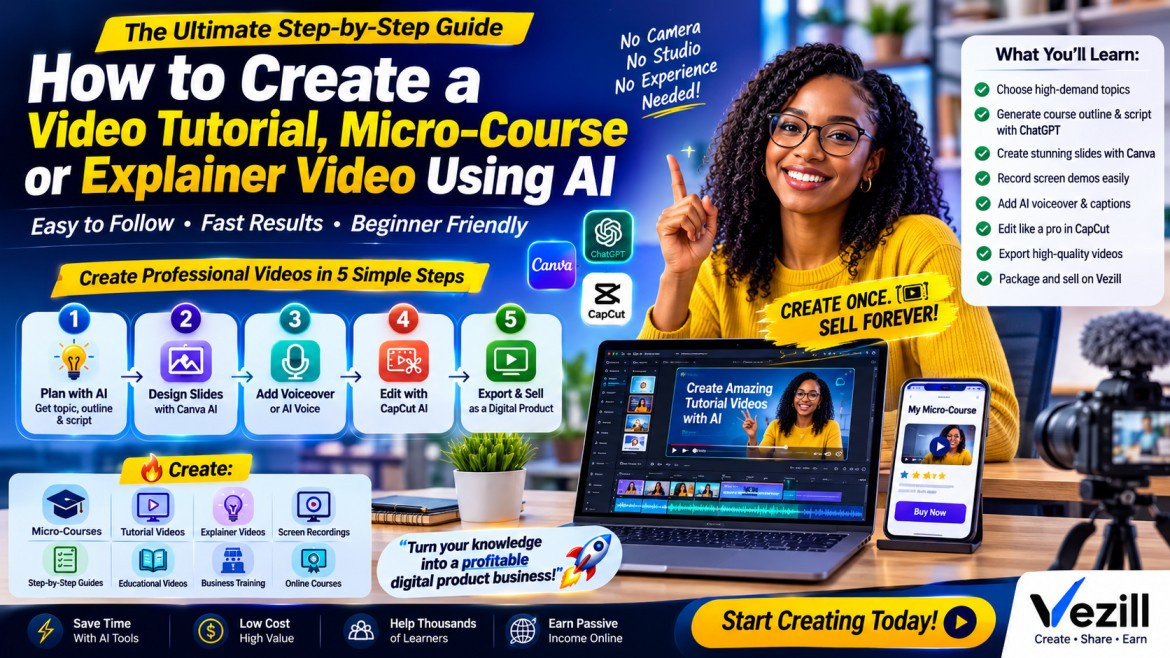
Learn How to Create a Video Tutorial, Micro-Course or Explainer Video Using AI
By Super Admin

Discover 150 high-demand micro-course, video tutorial and explainer video ideas you can create with AI and sell online as digital products.
By Super Admin
Get the updates, on newly released, popular & fast-moving MRR digital products
Up to Top
Comments All
Jackline
@jackline
I’ve been curious about how people use AI to create digital products, so the step-by-step approach was really helpful. It makes the whole process feel much simpler and easier to get started with. Definitely picked up a few ideas from this.
September 10,2026 At 10:18 PM
Emmanuel
@emmanuel
This is a good starting point for someone who has an idea but doesn’t know where to begin. Going from identifying a problem to creating and refining the product gives the process a much clearer direction.
September 05,2026 At 02:13 PM
Ryan
@ryan
The step-by-step workflow makes creating a digital product with AI feel much less overwhelming. I especially like the part about using AI for research and drafting, but still reviewing and improving the final product yourself.
September 01,2026 At 03:08 PM