
Here’s how you — as a creator — can get your video or PDF live on Vezill:
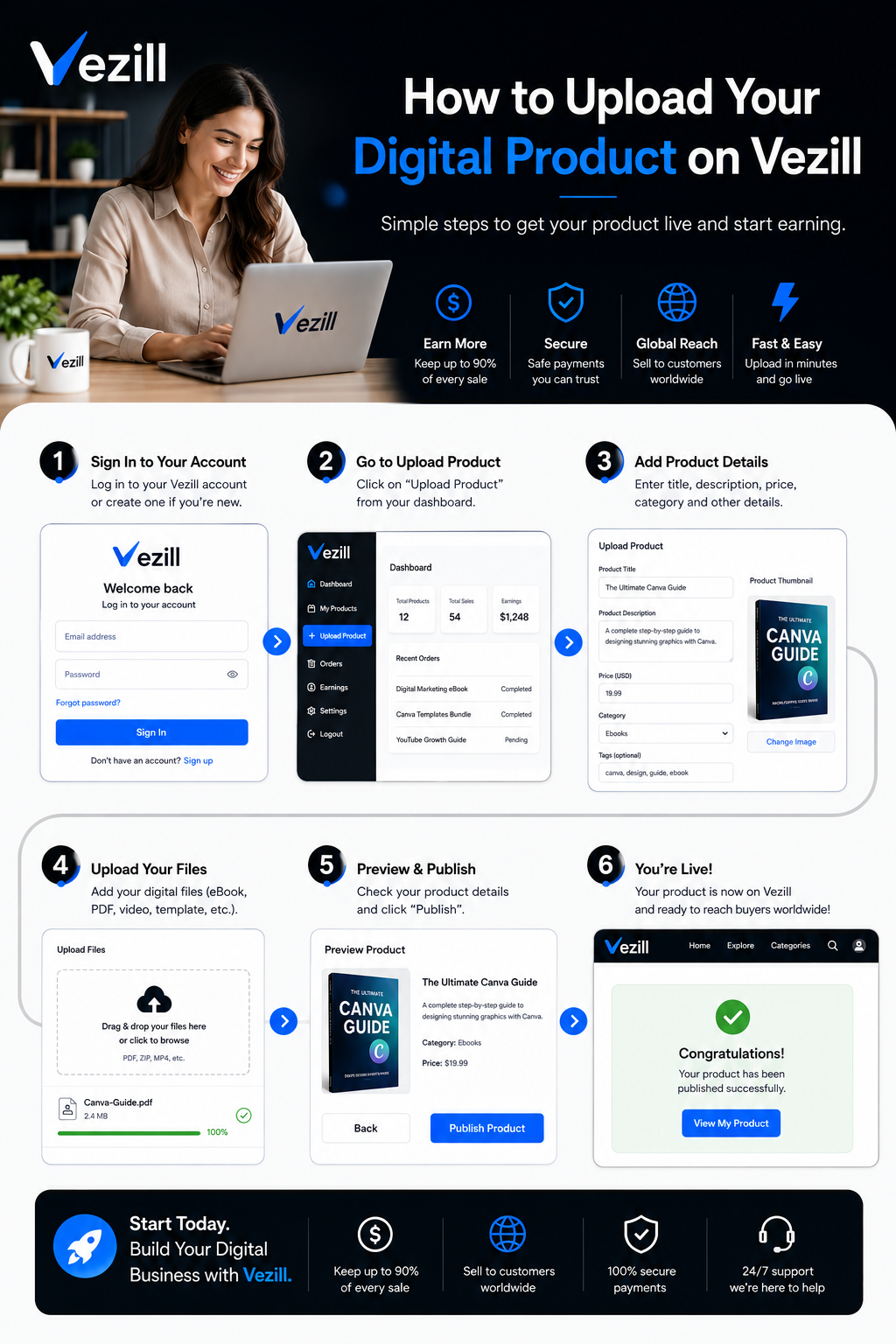
Create Your Account (if you haven’t already)
Go to Vezill.com and sign up / register.
Once signed up, log in to access your creator dashboard.
Update your profile. People want to know who they are buying from.
Prepare Your Product
For video: Record/edit your video content using your camera or screen-recording tool, compress/edit if needed, and export in a common video format (e.g. MP4). You may upload your video on your YouTube account as “unlisted”- and use the link when uploading on Vezill.
For PDF/document: Compile your document (e.g. guide, eBook, checklist) and export as PDF (or another supported document format).
Optionally: Create a good title, description, a cover image/thumbnail/mockup, and write a detailed description (benefits, what’s included, intended audience, reseller rights). This helps with visibility and sales.
Uploading Product - Go to “Start Selling”
Once logged in, navigate to the “Start Selling” product upload area. This is the launching point for creators.
Choose the type of product you’re uploading - video, document (PDF) or Script files. The system supports both videos (link & file) and documents.
Fill in Product Details
Title: Give your product a clear, descriptive name. Example: “Complete Instagram Ads Tutorial” or “Beginner Freelancing PDF Guide”.
Description: Write a detailed description - what the content covers, who it’s for, benefits, what’s included (e.g. number of lessons, format, etc.) and if it has master resell rights. This helps buyers know what they are purchasing.
Upload the File: Upload your video file or PDF. For video content, some creators might also use video links (depending on Vezill’s current support), but uploading the file itself ensures buyers can directly download or stream after purchase.
Cover / Thumbnail / Artwork: Attach a cover image or thumbnail for your product. A professional-looking cover helps attract buyers. You can add some screenshots for your PDF product to just to show your buyers a snippet of what they will be getting.
Set Pricing & Rights
Set a selling price for your product. Vezill’s minimum selling price is $10 (and its equivalent), but you should choose what makes sense for your content and target audience.
Decide whether to enable Master Resell Rights (MRR), this lets buyers resell your product and keep 90% profit while you earn 10% royalties for every resell. You can also set the minimum resell price. Enabling MRR can boost reach and resale-based earnings.
Publish / Submit for Review
Once all fields are filled and file uploaded, submit your product. Your product is now being reviewed and pending approval.
After approval, your product becomes visible to Vezill’s audience. Vezill will list it in the relevant category (Education, Business, Informative, etc.), making it available for purchase/resale.
Promote Your Product
Share your product link on social media (WhatsApp Status, Instagram, TikTok, YouTube, Facebook, X, etc.), on forums, or with your existing audience. This is emphasized as a core part of success on Vezill.
Use a good description, appealing cover, screenshots, and a trailer/promotional (for videos). this helps in conversions.
Quality matters: Whether video or PDF, ensure clarity, good editing, well-structured content, easy-to-follow flow. High quality increases trust and sales.
Target a niche or a concrete problem: Tutorials, how-to guides, checklists, or deep-dive content tend to sell better, for example: “How to use WhatsApp Business effectively”, “Beginner’s guide to freelancing”, “Excel masterclass for beginners”, etc.
Use clear metadata (title, description, tags, cover): This helps buyers find your product.
Enable Master Resell Rights (MRR): This can significantly expand reach via resellers. More resellers = more potential customers & growth.
Promote aggressively outside Vezill: Use social media, direct messaging, content platforms. Vezill expects creators to drive their own traffic.
Formats (video/PDF): Use simple format for videos & Documents/ PDF guide. This makes it easy to access, gives more value and may increase perceived worth. Include proper documentation for software/script files in the zipped file.
Content must align with “moral values”: Vezill only allows content that “adds value” and adheres to moral standards.
Earnings & Fees: Vezill charges a system fee (10%) when you earn deducted while withdrawing your funds.
Rights and Resale Terms: If you grant Master Resell Rights, you should understand that buyers/resellers will have license to resell your content for Private Lable Rights, buyers/resellers will have license to modify and resell your content as their own. This affects your earnings model and pricing strategy.
Self-promotion is critical: Like many digital platforms, uploading doesn’t guarantee sales; you need to actively promote your digital product.
Upload your First Digital Product HERE
Get the updates, on newly released, popular & fast-moving MRR digital products
Up to Top