
Ellan
Joined - December 2025

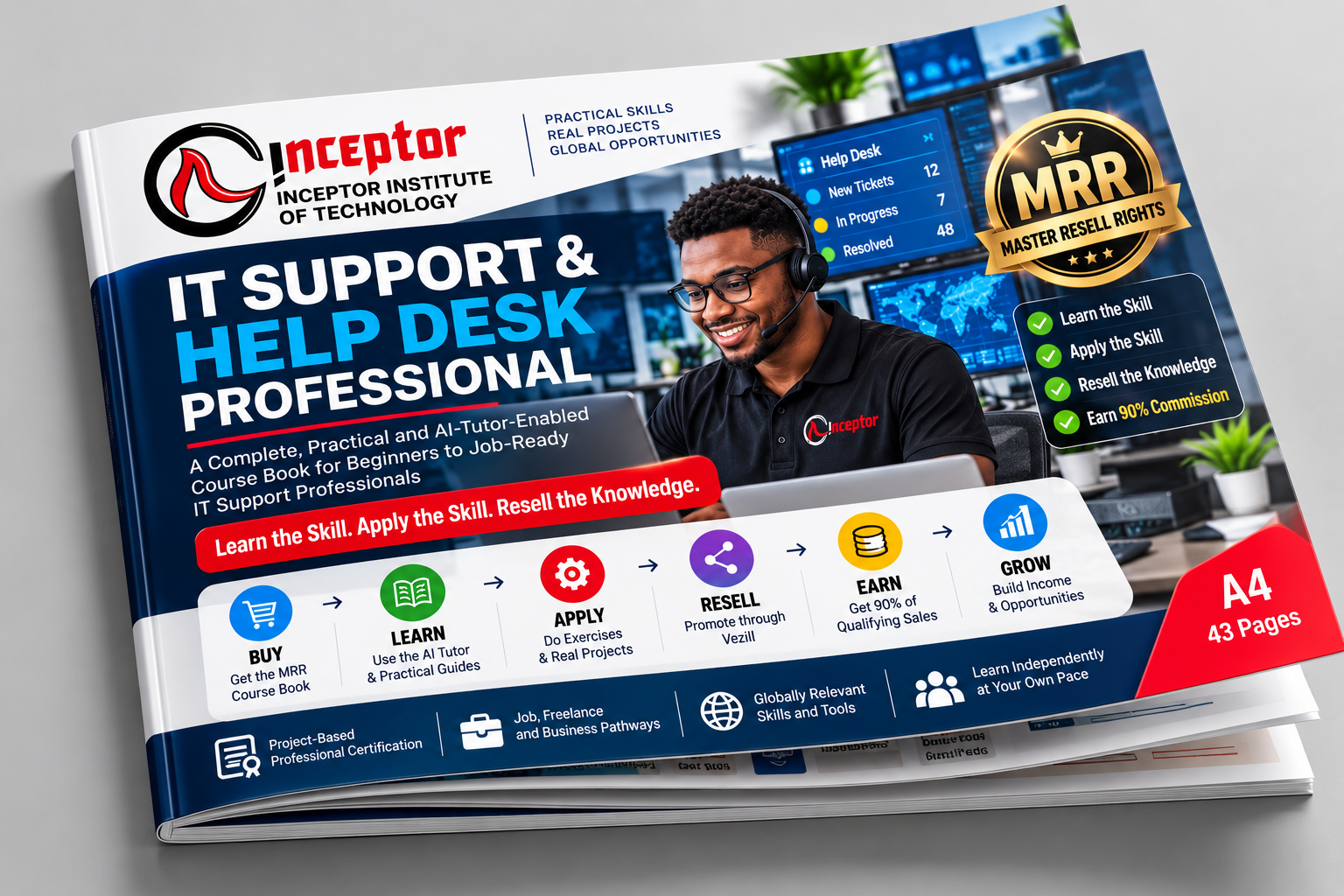
By Inceptor Institute of Technology
Self-Paced • AI-Guided • Hands-On • Project-Based
Want to learn IT support, help desk, computer troubleshooting, networking and technical support without depending entirely on a traditional classroom?
The IT Support & Help Desk Professional Course by Inceptor Institute of Technology is a practical, beginner-friendly professional training program designed to help you progress from basic computer knowledge to confidently diagnosing, troubleshooting, documenting and resolving real-world IT support problems.
You don't just read about IT support.
You learn it → practise it → troubleshoot real problems → complete projects → build evidence → submit your project → demonstrate your competence.
And when you purchase the eligible digital course book through Vezill, there is another opportunity:
You can learn the skill AND, subject to the applicable Vezill Master Resell Rights licence, resell the course book and receive 90% of qualifying sales revenue.
Almost every modern organization depends on computers, networks, cloud services, user accounts, software and connected devices.
When something stops working, somebody needs to diagnose the problem and get the user working again.
That is the role of IT support.
Current entry-level IT support training typically focuses on troubleshooting, customer care, networking, operating systems, system administration and security. Google also identifies roles such as IT Support Technician, Help Desk Technician and IT Specialist as pathways for people developing these foundational competencies. Grow with Google APAC
This Inceptor course takes that foundation further through an AI Tutor-Enabled, project-based learning model built around practical performance rather than passive reading.
By working through the course, exercises and projects, you will develop practical ability in areas such as:
Computer hardware, peripherals and common device problems
Windows installation, configuration and troubleshooting
Software installation and application support
User accounts, permissions and access problems
Networking fundamentals and internet connectivity troubleshooting
IP addressing, DNS, DHCP and common network diagnostics
Wi-Fi troubleshooting
Microsoft 365 and workplace technology support
Help desk tickets, incident handling and escalation
Remote technical support
Customer communication and professional support etiquette
Cybersecurity fundamentals for support professionals
Safe account and endpoint support
PowerShell and useful administrative workflows
Technical documentation and knowledge-base creation
AI-assisted troubleshooting and support documentation
Systematic fault diagnosis
Real-world IT support scenarios
Portfolio and evidence development
IT support interview and career preparation
These competencies closely reflect the practical foundation expected in modern introductory IT support training.
A good IT support professional doesn't simply memorize fixes.
You need to be able to ask:
What is the problem?
What changed?
What information do I need?
What is the likely cause?
How can I test it safely?
Did the solution actually work?
How should I document it?
Should I resolve or escalate it?
That is why this course repeatedly uses the learning sequence:
You learn the concept.
You see how it works.
You perform the task yourself.
Your work is reviewed.
You correct mistakes.
Then you demonstrate the skill with reduced assistance.
The goal is not simply to say:
"I completed an IT support course."
The stronger outcome is:
One of the distinguishing features of this course book is the AI Tutor-Enabled Self-Paced Learning System.
Instead of giving you a PDF and leaving you to figure everything out alone, the course contains ready-to-use prompts that turn a capable AI assistant into a structured learning partner.
Your AI tutor can help you:
Learn — explain technical concepts at your level.
Practise — generate exercises and troubleshooting scenarios.
Simulate — act as a user, customer, manager or help desk environment.
Troubleshoot — guide you through diagnosing a technical problem.
Review — evaluate your work against supplied criteria.
Correct — identify mistakes and help you understand why they happened.
Prepare — conduct quizzes, mock assessments and interview practice.
Improve — increase the difficulty as your skills develop.
This approach is consistent with the growing role of AI in IT support itself. Google now incorporates AI into IT support training for troubleshooting, customer care, scripting, support documentation and infrastructure evaluation.
Important: AI Does Not Do the Learning for You
The course is intentionally designed to prevent the learner from simply asking AI to complete assignments.
You must still perform the tasks, troubleshoot problems, explain your decisions and produce evidence.
AI is your instructor and assistant- not a substitute for competence.
Imagine receiving support requests such as:
"My laptop connects to Wi-Fi, but websites won't open."
"I forgot my password and can't access my account."
"The printer shows online, but nothing prints."
"My Windows computer has suddenly become extremely slow."
"Microsoft 365 isn't synchronizing."
"A user clicked a suspicious email link. What should we do?"
The course trains you to approach such problems systematically rather than randomly trying fixes.
You learn to:
IDENTIFY → DIAGNOSE → TEST → FIX → VERIFY → DOCUMENT → ESCALATE WHEN NECESSARY
Employers and clients are more interested in what you can actually do than how many pages you have read.
You therefore complete practical exercises, mini-projects and a final competency project.
Your evidence portfolio can include:
Troubleshooting reports • Ticket records • Network diagnostics • System configurations • Screenshots • Support documentation • Knowledge-base articles • PowerShell work • Security checklists • User-support simulations • Project documentation • Reflection and correction records
This gives you material that can help demonstrate your skills to potential employers or clients.
Your learning journey culminates in an Inceptor Final Competency Project.
The project requires you to combine the major skills covered in the course to respond to a realistic IT support environment.
You must produce the required deliverables and evidence showing how you diagnosed problems, selected solutions, performed technical work, verified results and documented your process.
The project is designed to answer one important question:
This is more than a read-and-download ebook.
It is structured as a professional learning and competency-development course.
After completing the required learning activities, practical work and final project, you can submit the prescribed project and supporting evidence to Inceptor Institute of Technology for evaluation.
Learners who satisfy the applicable assessment requirements can qualify for an:
Important: Simply buying or reading the course book does not automatically earn certification.
Certification is based on the applicable project submission and evaluation requirements.
This distinction protects the value of the certificate:
Learn → Practise → Build → Submit → Prove → Get Assessed → Get Certified
This course can be suitable for complete beginners, KCSE graduates, university and college students, ICT students, job seekers, career changers, office administrators, aspiring freelancers, entrepreneurs and people who already troubleshoot computers informally but want a structured professional skill set.
You do not need to begin as an IT expert.
Beginner-focused IT support pathways commonly require no prior professional experience; the important part is progressing through the technical concepts and hands-on work systematically.
Depending on your demonstrated skills, additional qualifications and employer requirements, relevant pathways can include:
IT Support Technician • Help Desk Technician • Service Desk Analyst • Technical Support Specialist • Desktop Support Technician • ICT Support Assistant • Junior IT Technician • End-User Support • Field Support Technician • Remote Support Technician
You can also use the foundation to progress toward areas such as system administration, networking, cloud support, cybersecurity and IT automation.
Google similarly identifies IT Support Technician, Help Desk Technician and IT Specialist among the roles associated with foundational IT-support training.
Your skills do not have to be limited to formal employment.
Once you have developed genuine competence, potential services can include:
PC troubleshooting • Windows support • Software installation • Wi-Fi/network troubleshooting • Remote technical assistance • Small-office IT support • Device setup • Microsoft 365 assistance • Basic security configuration • Technical documentation • Preventive maintenance
The course also helps you think about professional service delivery, client communication, scope, documentation and quality assurance.
No employment, client volume or income is guaranteed; the purpose is to give you practical skills that can support multiple professional pathways.
Inceptor currently offers the IT Support & Help Desk Professional course through:
Physical Classroom Training in Nairobi
Learn through instructor demonstrations, guided practical work and hands-on troubleshooting.
Instructor-Led Online Training
Learn remotely with structured instructor support.
Self-Paced AI Tutor-Enabled Course Book
Study independently at your own pace using the course book as your curriculum and AI as an interactive learning assistant.
The current Inceptor course page lists the program as 8 weeks, beginner-to-intermediate, with physical, instructor-led online and self-paced options.
View the IT Support & Help Desk Professional course at Inceptor
Use the course book to develop practical IT support and help desk skills.
But eligible purchases can also provide another opportunity.
When this course book is purchased with the applicable Vezill Master Resell Rights (MRR) licence, an eligible buyer may also receive rights to promote and resell the authorized course book through Vezill under the applicable licence and platform terms.
The model is simple:
You buy the eligible course book.
You learn what it teaches.
You apply the knowledge and understand the product.
You promote the authorized product to other people who genuinely need the knowledge.
When qualifying sales are attributed to you under the applicable Vezill reseller arrangement, the stated reseller share is:
subject to applicable Vezill terms, transaction rules, fees, refunds, taxes and policies.
This means the course book can potentially become both:
A learning asset
and
an authorized digital product you can market.
Purchase the MRR-enabled IT Support & Help Desk Professional course book.
Study the course so you understand the product and the knowledge you are recommending.
Complete exercises and projects and develop genuine familiarity with the subject.
Create useful content for people interested in learning IT support.
Promote the eligible product using your authorized Vezill reseller mechanism.
Receive the applicable reseller share on qualifying attributed sales.
Measure what works and develop a repeatable digital-product marketing process.
This product's eligible MRR product is priced at KSh 3000.
At a 90% reseller share:
1 qualifying sale = KSh 2,700
10 qualifying sales = KSh 27,000
50 qualifying sales = KSh 135,000
100 qualifying sales = KSh 270,000
These calculations only demonstrate the mathematics of a 90% share. They do not represent guaranteed or typical earnings.
Actual results depend on product demand, pricing, audience, marketing activity, conversion rates, competition, refunds, fees, taxes and individual execution. A reseller may earn more, less or nothing.
A better strategy is:
People search for questions such as:
"How do I become an IT support technician?"
"Best IT support course for beginners"
"Can I learn IT support from home?"
"IT support course in Kenya"
"Help desk training online"
"How do I learn computer troubleshooting?"
"What skills do I need for an IT support job?"
"Can AI help me learn IT support?"
A Vezill reseller can create useful TikTok videos, Facebook posts, WhatsApp Status content, YouTube tutorials, LinkedIn posts and other educational content answering these questions and then direct genuinely interested learners to the course.
The principle is:
Many resources give you information.
This learning system is designed to make you perform.
Gives you the curriculum, explanations, exercises, projects, assessments and roadmap.
Explains, demonstrates, quizzes, simulates, reviews and helps you troubleshoot.
Makes you perform the technical tasks yourself.
Move you from isolated exercises to realistic work.
Helps you demonstrate what you have actually accomplished.
Evaluates the prescribed final project and evidence for certification under the applicable requirements.
Adds an optional digital-product reselling pathway for eligible MRR purchases.
Together, the model becomes:
You don't need to know everything about technology before starting.
Start with one of the most fundamental abilities in IT:
Learn how computers work.
Learn how networks connect.
Learn how users experience problems.
Learn how to diagnose those problems.
Learn how to communicate professionally.
Learn how to use AI intelligently.
Learn how to document your work.
Build projects.
Create evidence.
Then use that competence to pursue your next opportunity.
IT SUPPORT & HELP DESK PROFESSIONAL
By Inceptor Institute of Technology
Self-Paced • AI-Guided • Hands-On • Project-Based
And with an eligible Vezill MRR purchase:
BUY → LEARN → APPLY → RESELL → EARN
Get the updates, on newly released, popular & fast-moving MRR digital products
Up to Top



Comments