

How to decide whether the tutorial, article, forum answer or AI instruction in front of you is reliable enough to follow.
Google gives you one set of instructions. A YouTube video shows another interface. A blog tells you to type a particular address into your browser. Reddit gives you three different answers. An AI assistant gives you a neat step-by-step list in seconds.
Then you look at your own router and nothing matches. The menus are different. The login address may be different. Your internet provider may have replaced the normal router interface with its own app. One tutorial may be for an older firmware version. Another may assume you already know the administrator password. A third may be perfectly correct — for a different device.
Reliable information is not only about whether something is “true.” It also has to be correct for your situation.This is the practical problem most people face online. Finding information is easy. Deciding whether it is reliable enough to act on is harder. That is what this guide teaches.
To find reliable how-to information online, first define the exact task, tool, version and context. Prefer official or primary sources when accuracy matters, then compare trustworthy independent sources where necessary. Check the publication or update date, confirm that instructions match your version, look for expected results and warnings, and verify important steps before taking irreversible action. The higher the consequence of getting something wrong, the stronger your verification should be.
RIGHT INFORMATION + WRONG CONTEXT = WRONG INSTRUCTIONS FOR YOU IN THIS GUIDE What “reliable” really meansThe 7-Part Reliability TestPopularity is not reliabilityThe How-To Source LadderStart with the source that controls the processThe Two-Source RuleHow much verification does this need?Check the date — but do not stop thereMatch the version and contextRead laterallyLook for expected resultsEvaluate YouTube, blogs and communitiesUse AI as an interpreter, not automatic authorityStop-and-Verify momentsThe VEZILL Reliability CheckWhen sources disagree30 practical examplesKenya + global contextWhen to stop searchingStructured Quick KnowledgeA source can be authoritative and still be unhelpful for your exact task. A source can be easy to understand and still be outdated. A source can be current and still omit a warning that matters to you. That is why “reliable” should not be treated as a single yes-or-no label. For practical instructions, reliability is a combination of qualities.
ACCURATEThe instructions are factually correct. RELEVANTThey solve the problem you actually have. CURRENTThey still apply to the present product, process or version. CONTEXT-MATCHEDThey fit your device, country, platform, account type or situation. COMPLETE ENOUGHThey include the prerequisites, dependencies and warnings you need. VERIFIABLEYou can confirm important steps and see whether the expected result occurred. SAFEThey acknowledge meaningful risks where the task can cause harm, loss or irreversible change.The goal is not to make every tutorial pass an academic review. The goal is to decide whether it is dependable enough for the action you are about to take.
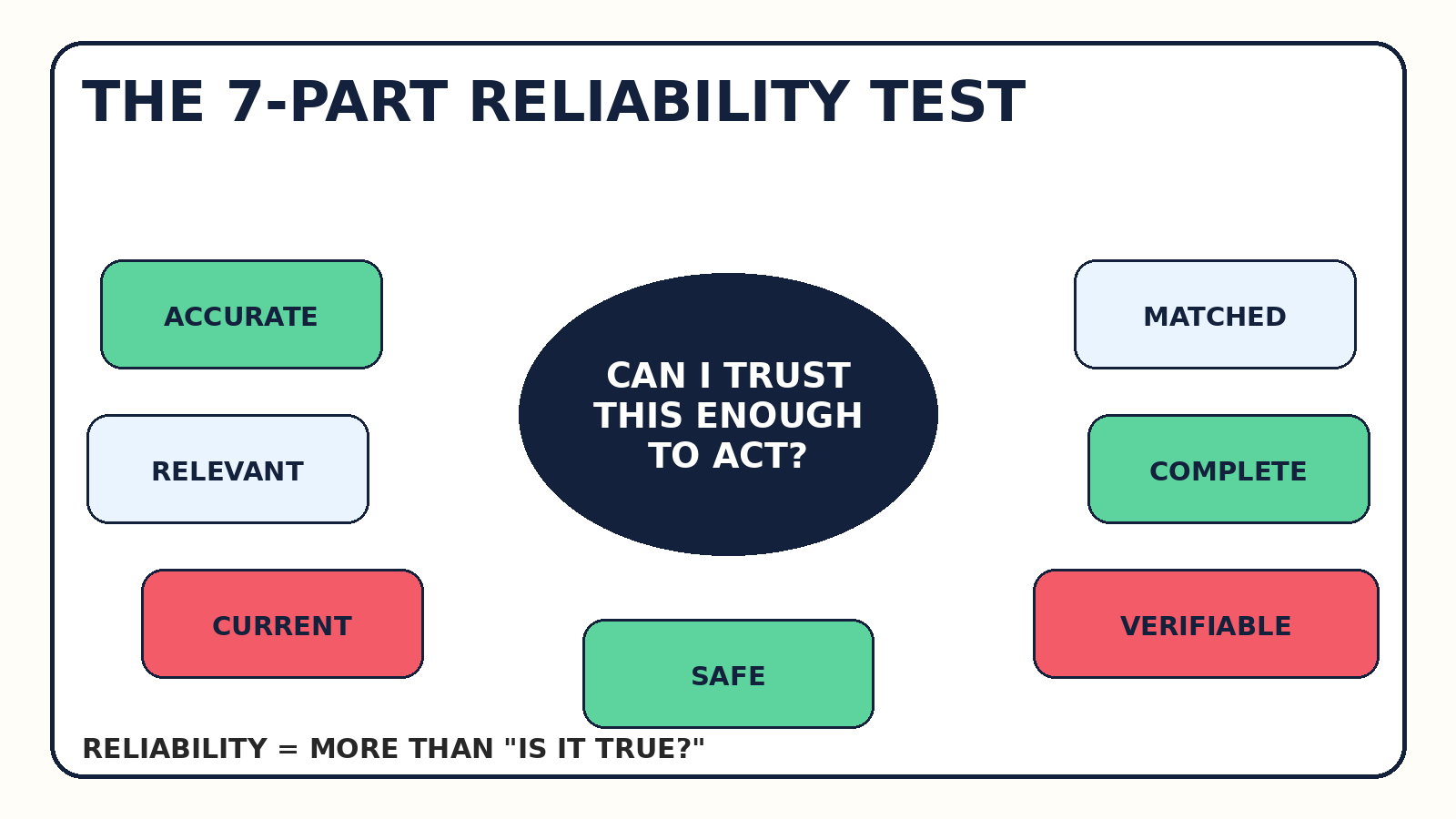 A practical VEZILL framework for deciding whether information is reliable enough to act on.
Run the seven questions quickly. Is the claim accurate? Does it answer my problem? Is it current? Does it match my exact setup? Does it include enough context? Can I check the result? Does it warn me about meaningful risks? A weak answer to one question does not always disqualify a source, but it tells you where to verify.
For example, a 2024 tutorial for an unchanged Excel formula may still be perfectly useful. A 2024 tutorial for a rapidly redesigned AI interface may be much less dependable. “Old” is not automatically wrong; freshness matters in proportion to how quickly the thing changes.
Views, likes, rankings and polished design are attention signals. They are not proof that a procedure is correct. Search engines rank pages using many signals, but the first result is not a universal certificate that every instruction on the page fits your situation. A YouTube video with millions of views can show an interface that no longer exists. A tiny official support page can be the definitive source for a setting. A forum comment with a handful of votes can accurately describe an edge case that a generic article missed.
Treat popularity as a clue that a resource was useful to many people — not as evidence that it is right for you. Reliability belongs to a specific claim in a specific context.
CLAIM + SOURCE + CONTEXT matter more than views, likes or polish.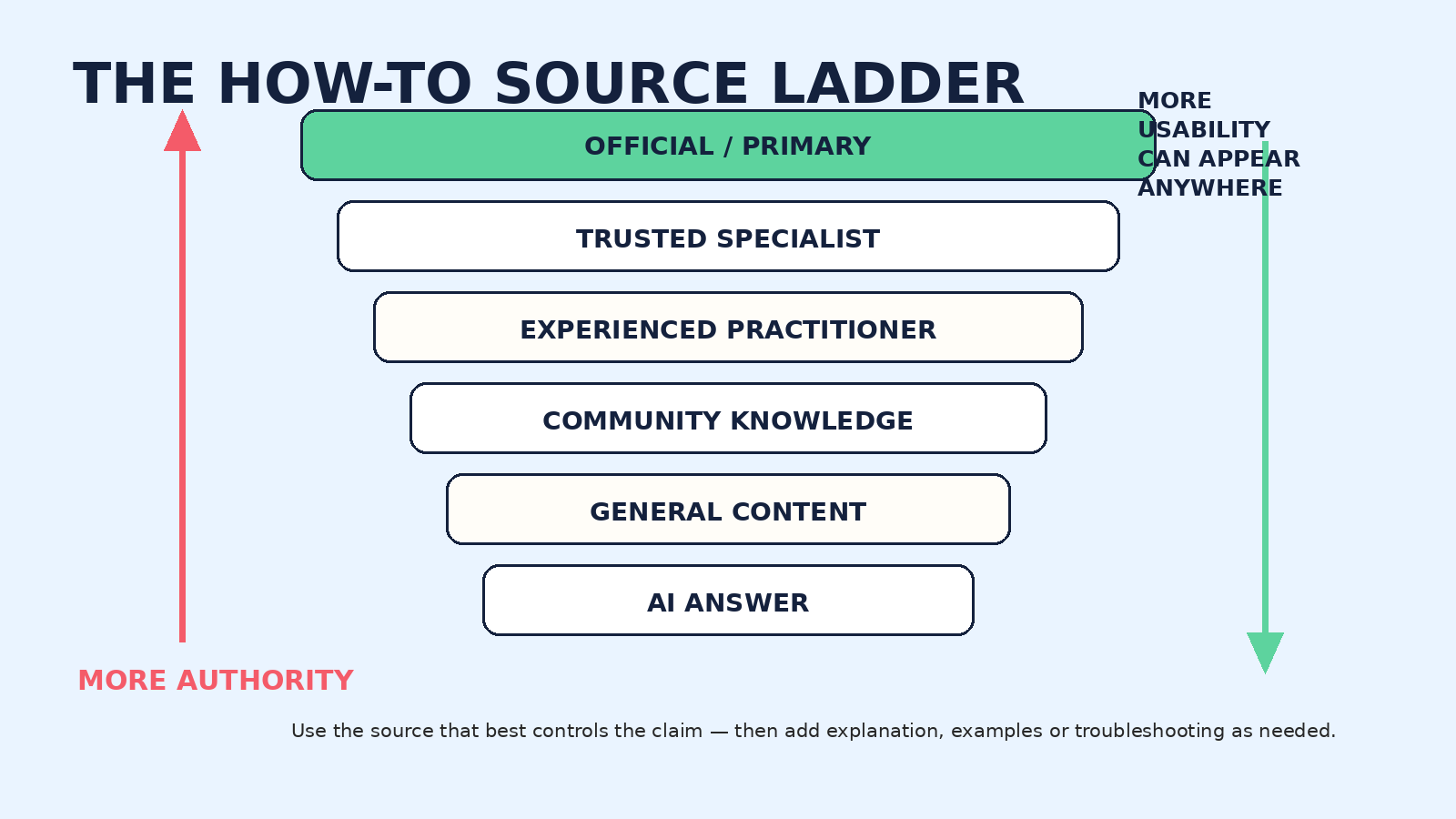 A useful source ladder is about authority and fit — not about declaring every lower rung “bad.”
Start by asking who actually controls or defines the thing you are trying to do. For a product feature, that is usually the maker. For a government process, it is the responsible agency. For a technical standard, it is the relevant standards body. For a scientific claim, the original research and credible syntheses matter more than a social post summarizing them.
But authority and usability are different. Official documentation may be precise yet difficult for a beginner. A practitioner may explain the same procedure far more clearly. A community thread may reveal a bug the official page does not yet describe. An AI assistant may translate documentation into plain language and help you compare your screen with the expected screen. The strongest workflow often combines authoritative grounding with a usable explanation.
If your question is “Which version of Windows am I running?”, Microsoft explains how to check the version and device information in Windows Settings. If you need to identify an iPhone model, Apple Support maps model numbers to devices. Those pages are better starting points than a random post because Microsoft and Apple control the products and documentation.
The same logic applies to regulated or official processes. For Kenyan tax filing, begin with Kenya Revenue Authority guidance. For business registration, the Business Registration Service on eCitizen is the authoritative starting point. If you are dealing with M-PESA business channels, consult Safaricom’s official material before relying on a third-party walkthrough.
Then add independent help when you need screenshots, simpler language, examples, comparison or troubleshooting. Think of it as “authority first, explanation second” when the task demands high confidence.
This is not a scientific law and two sources do not automatically create truth. Two copied blog posts may come from the same wrong original. Instead, try to make the second source independent or more authoritative. If a tutorial tells you to delete a configuration file, check the official documentation, what the file controls, whether a backup is recommended, and whether a safer reset option exists.
The point is not endless research. The point is to stop one weak instruction from becoming your only basis for an irreversible action.
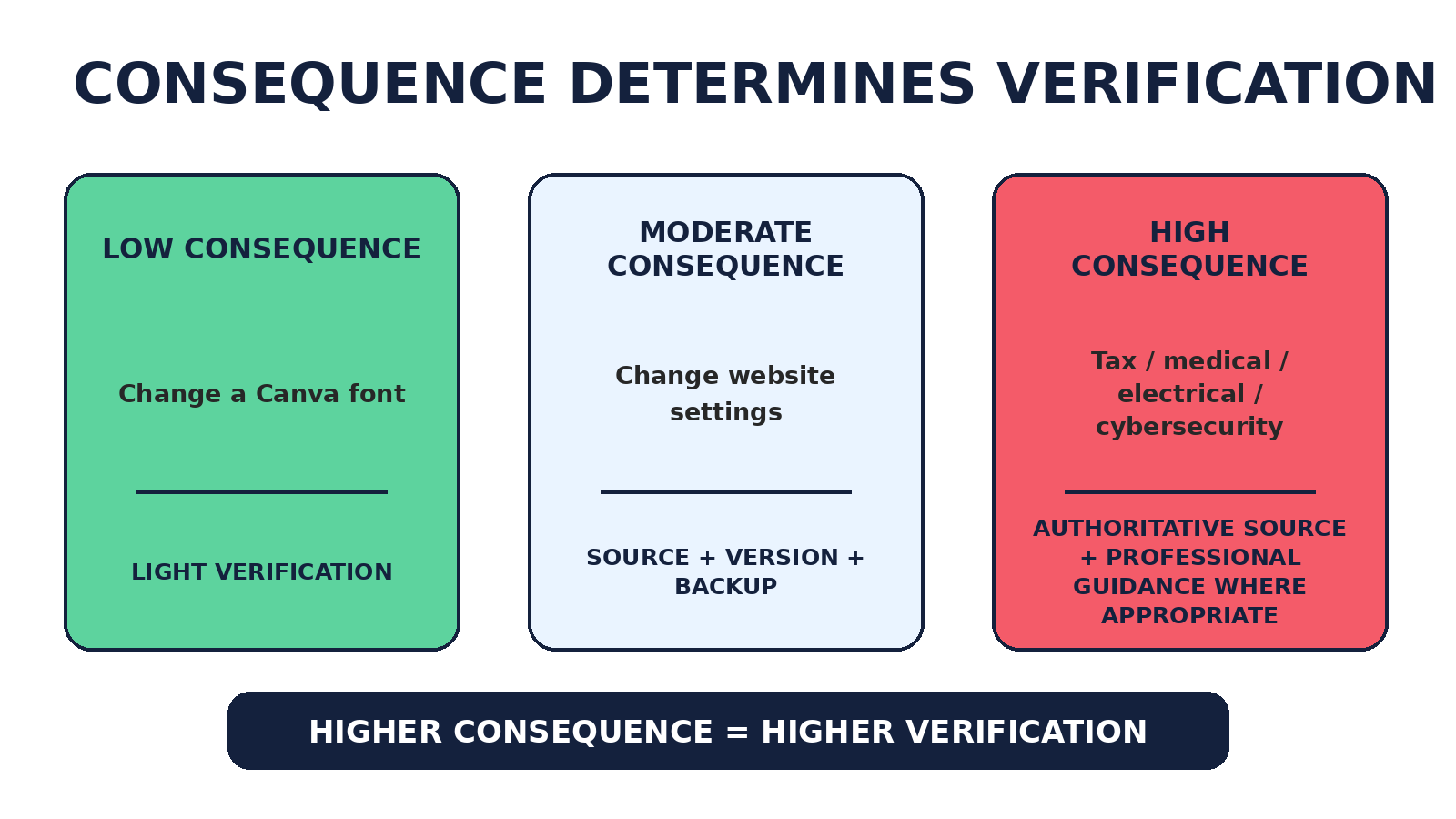 The more costly an error would be, the stronger the verification should become.
Verification should be proportional. Changing a font in Canva is easy to reverse. Changing DNS records for a business website can create downtime. Filing a tax return, changing medication or doing electrical work can carry legal, financial or safety consequences. Treating all of these as “just follow the tutorial” is a category error.
Examples include changing document formatting, resizing an image, creating spreadsheet styling or changing an app theme. You can often test and undo the result. A clear, context-matched tutorial may be enough.
Examples include installing software, changing website settings, editing analytics tracking, configuring email or modifying an ecommerce store. Confirm the source and version, save the existing state, use a backup or staging environment where practical, and know how to reverse the change.
Taxes, contracts, medical treatment, electrical work, structural work, cybersecurity, investments and vehicle safety deserve authoritative information and, where appropriate, qualified professional guidance. A step-by-step page can support understanding; it should not be used to bypass expertise the situation actually requires.
A date is useful, but “Published 2026” does not guarantee that the instructions are current. A site may update a timestamp without revisiting every screenshot. A tutorial may reuse a video recorded against an older interface. A page can be current overall while one subsection is stale.
Inspect the interface shown, menu names, product version, release notes, comments and update history. If the task depends on software behavior, compare the tutorial with the product’s current documentation or changelog.
FRESH DATE ≠ FRESH INSTRUCTIONSMany “wrong” tutorials are really mismatched tutorials. Add details that narrow the task before you search.
| Too broad | Better |
|---|---|
| How to change WordPress spacing | WordPress 6.x Gutenberg change block spacing |
| Create PivotTable Excel | Excel Microsoft 365 create PivotTable |
| Change router password | [router model] [firmware/provider] change Wi-Fi password |
This extends the search method in VEZILL’s guide to finding practical knowledge online: the more accurately you describe the real task, the easier it is to judge whether the answer fits.
The Digital Inquiry Group teaches lateral reading as a research-backed strategy for evaluating online information: instead of judging a site only by what it says about itself, leave the page and investigate the source elsewhere.
That means opening another tab and checking who owns the site, what the author is known for, whether credible organizations recognize the source, whether the claim appears in primary material, and whether there are financial or ideological interests that matter to the claim.
VERTICAL READINGStay on the page and judge it mainly from its design, About section and internal claims. LATERAL READINGLeave the page and investigate the source through other independent sources.Lateral reading is especially useful when a site looks polished but you do not know who is behind it. It prevents design quality from becoming a substitute for credibility.
A strong how-to guide should not only tell you what to click. It should help you know whether the step worked.
ACTION → EXPECTED RESULT → CHECKSuppose a guide says, “Click Export.” A better guide adds: “A PNG file should download. Open it and confirm the background is transparent.” That turns the instruction into a checkpoint. If your result differs, you notice the mismatch before continuing into five more steps.
Checkpoints matter because errors compound. If step three failed silently, step eight may produce a confusing result that looks unrelated. Good instructions make the path observable.
Pay attention to what a guide tells you to protect before making changes. Does it tell you to duplicate a design, back up a website, export current configuration, note the existing settings, use a staging environment, create a restore point or avoid exposing credentials?
Warnings are especially valuable when a task contains destructive steps. A guide that casually says “delete this folder,” “disable this protection” or “run this command as administrator” without explaining the consequence deserves stronger scrutiny.
Comments can reveal that a menu moved, a command stopped working, a step deletes data, a fix works only on Android, or a new version changed the process. This is useful evidence about real-world friction.
But comments can also contain guesses, outdated workarounds and confidently wrong advice. Treat them as signals that tell you what to investigate — not as proof that a procedure is correct.
Check the publication or update date, the version shown on screen, the creator’s relevant experience, description links, pinned corrections, whether the full process is demonstrated and whether the final result is shown. Scan recent comments for interface changes or broken steps. Subscriber count can indicate reach; it does not establish technical correctness.
Look for a named author or accountable organization, clear dates, links to official sources, screenshots that match the present interface, version details, examples, warnings and an update history. Also notice commercial incentives. A guide can be useful even when it contains affiliate links, but the recommendation should be judged separately from the financial relationship.
Do not use the shortcut “AI-written = bad.” Production method is not the core reliability test. Accuracy, sourcing, specificity, context, revision and human verification matter more.
Community sources are often excellent for obscure errors, bugs, compatibility problems and edge cases. But distinguish “this fixed my setup” from “this is the officially supported solution.” Those are different claims.
Check the answer date, software version, later replies, maintainer comments and linked documentation. For code or terminal commands, understand what the command does before executing it. Copy-pasting a command you cannot explain can turn troubleshooting into a security or data-loss problem.
AI has changed how people consume how-to information because it can make static instructions interactive. You can ask for a simpler explanation, show a screenshot, ask what should happen next, request one step at a time, or ask the assistant to compare two procedures. Current ChatGPT web search can include citations and source links; OpenAI explicitly advises users to open cited sources, check publication dates and use authoritative sources when accuracy matters. Google has likewise continued adding links and source discovery features to its AI search experiences.
AI CAN HELP YOU UNDERSTAND A SOURCE. IT SHOULD NOT AUTOMATICALLY BECOME THE SOURCE.AI can still invent menu names, combine instructions from incompatible versions, misunderstand a screenshot, summarize a weak page too confidently or fail to notice that a cited source does not support a specific step. Use it as an interface for understanding and comparison — then inspect the source when the decision matters.
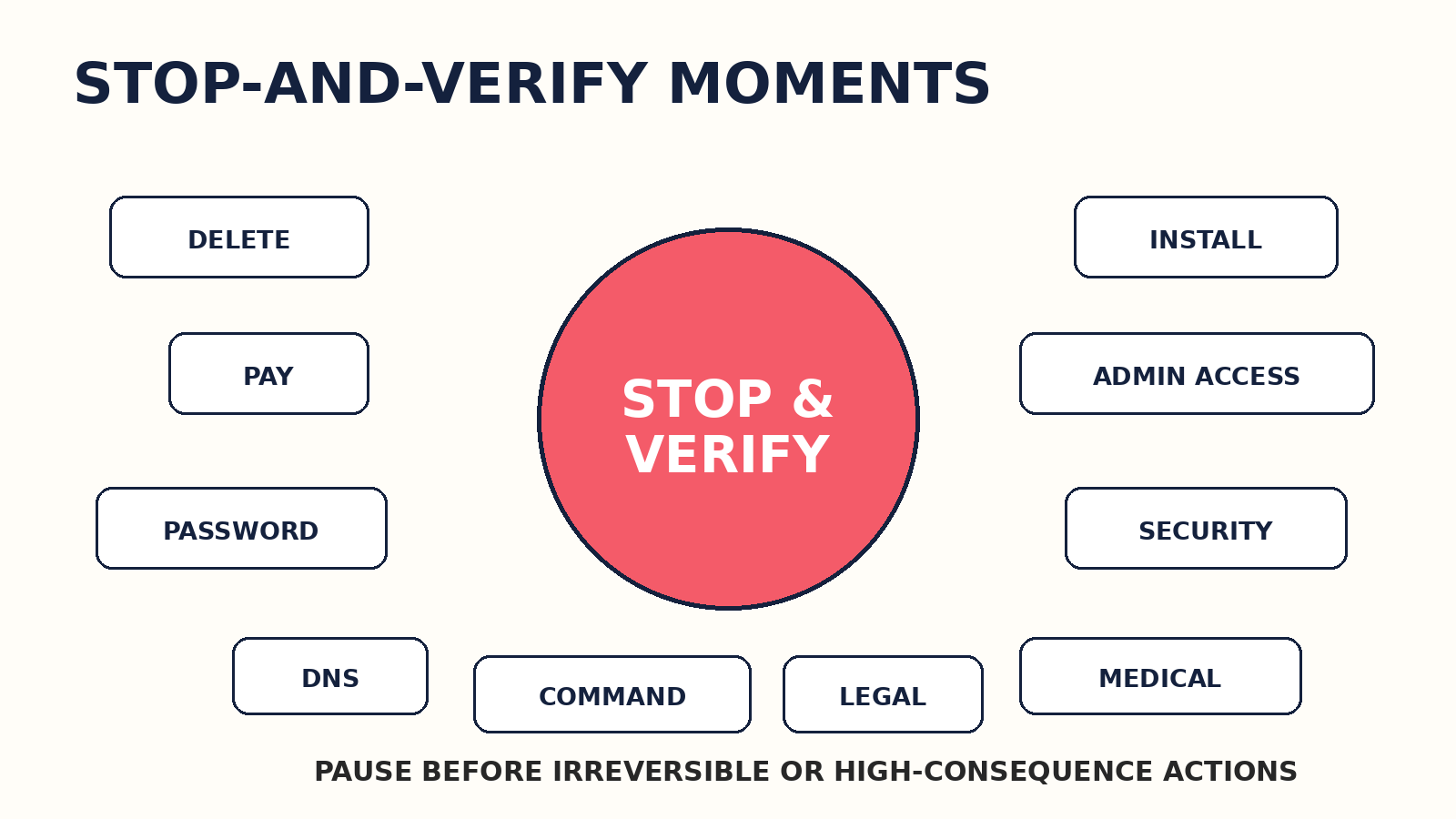 Some actions deserve a deliberate verification step before you continue.
Pause when instructions ask you to delete or overwrite data, send money, enter payment details, reveal credentials, disable security, install unknown software, grant administrator access, change DNS, modify permissions, run terminal commands, change tax information, sign legal terms, alter medical treatment or bypass warnings.
The pause is not fear. It is a checkpoint. Ask what the action changes, whether it is reversible, what the authoritative source says, what backup is available and what happens if the instruction is wrong.
The following score is a VEZILL practical decision aid, not a scientifically validated credibility scale. Its purpose is to make the gaps visible. Score each area from 0 to 2.
| Factor | Question | 0 | 1 | 2 |
|---|---|---|---|---|
| SOURCE | Who produced it? | Unknown / unaccountable | Some relevant experience | Primary, official or clearly qualified source |
| DATE | Is it current? | No date / clearly stale | Date exists; freshness uncertain | Current for this changing process |
| MATCH | Does it fit my situation? | Wrong/unknown context | Partially matched | Matches tool, version and context |
| EVIDENCE | Does it connect to stronger evidence? | None | Some supporting links | Clear primary/authoritative support |
| CHECKPOINTS | Can I verify progress? | No | Some outcomes shown | Important steps have expected results |
| RISK | Are consequences explained? | Risks ignored | Some warnings | Meaningful risks and reversibility addressed |
| RESULT | Is success clear? | Vague outcome | Partly clear | Final result is concrete and testable |
12–14: strong starting resource. 8–11: potentially useful, but verify important gaps. 0–7: do not rely on it without stronger confirmation. A high score still does not override professional guidance in high-consequence areas.
Do not “majority vote” between web pages. Three copied articles can all repeat the same error. Instead, resolve the reason for disagreement.
1. Check dates. One source may describe an older interface or policy. 2. Check versions. They may be correct for different software, devices or account types. 3. Check country and context. Rules, services and products vary by region. 4. Check the exact problem. The sources may be answering different questions that only look similar. 5. Find the primary source. Use the manufacturer, agency, maintainer, standard or original research where appropriate. 6. Look for release notes or changelogs. A recent change may explain the conflict. 7. Test safely when reversible. A sandbox, duplicate file or staging environment can provide evidence without risking the live system. 8. Escalate when consequences are high. Ask a qualified professional when the cost of being wrong is significant.| Task | Best starting source | What to verify | Risk |
|---|---|---|---|
| Change an iPhone setting | Apple Support | iOS version + exact model | Low |
| Check your Windows version | Microsoft Support | Edition + version | Low |
| Create a PivotTable | Microsoft Support | Excel version / Microsoft 365 | Low |
| Resize a Canva design | Canva Help | Current editor interface | Low |
| Export transparent PNG | Design tool help | File format + transparency setting | Low |
| Change WordPress block spacing | WordPress docs + theme docs | WordPress + theme + editor version | Moderate |
| Install a WordPress plugin | Plugin page + WordPress docs | Compatibility + backups + permissions | Moderate |
| Change DNS records | Domain/DNS provider docs | Record type + exact host/value + rollback | High |
| Configure business email | Email provider docs | DNS + account plan + domain ownership | Moderate |
| Install desktop software | Publisher’s official site | OS + architecture + installer source | Moderate |
| Run a terminal command | Official docs / maintainer docs | Command purpose + privileges + reversibility | High |
| Fix a GitHub library bug | Project docs + GitHub Issues | Package version + maintainer comments | Moderate |
| Use an API endpoint | Official API docs | API version + auth + limits | Moderate |
| Add analytics tracking | Analytics platform docs | Property/account type + consent needs | Moderate |
| Set up ecommerce payments | Payment provider docs | Country + account eligibility + fees | High |
| Change an ad campaign setting | Ad platform help | Campaign type + current interface | Moderate |
| Verify an AI tool feature | Official product docs/help | Plan + region + rollout status | Low |
| Use an AI-generated formula | Official docs + test data | Inputs + edge cases + output | Moderate |
| Create a spreadsheet budget | Spreadsheet docs / reputable template | Formulas + categories + assumptions | Low |
| File a Kenyan tax return | KRA | Tax year + obligation + current filing rules | High |
| Register a business in Kenya | BRS/eCitizen | Entity type + fees + required documents | High |
| Set up M-PESA business tooling | Safaricom | Till/PayBill type + current portal/app | High |
| Interpret a contract clause | Qualified legal source/professional | Jurisdiction + exact contract | High |
| Change medication | Qualified medical professional + official medicine guidance | Individual health context | High |
| Repair household wiring | Qualified electrician / electrical authority | Circuit + local code + isolation | High |
| Fix a vehicle braking issue | Manufacturer/service professional | Model + safety procedure | High |
| Back up a phone | Device maker support | Cloud/storage capacity + encryption | Moderate |
| Reset a router | Router/provider docs | Model + ISP settings + admin credentials | Moderate |
| Create a QR code | Trusted tool + test scan | Destination URL + permanence | Low |
| Automate a workflow | Tool docs + test workspace | Permissions + trigger logic + failure handling | Moderate |
For universal software questions, the product maker may be globally authoritative. Microsoft is a strong starting point for Excel. Apple is a strong starting point for iPhone settings. WordPress documentation is useful for WordPress core behavior.
For Kenyan government processes, the controlling authority changes. If you search “how to register a business in Kenya,” an American entrepreneurship blog should not override the Business Registration Service. If you search “how to file a Kenyan tax return,” KRA should anchor the answer. Third-party explainers can make the process easier to understand, but they should be checked against the current official process.
AUTHORITY DEPENDS ON WHO CONTROLS THE PROCESS.This principle travels well internationally. Replace KRA with the tax authority in the relevant country, BRS with the correct company registry, and Safaricom with the service provider that actually controls the product. Context is part of reliability.
Even excellent sources can contain mistakes, outdated screenshots, assumptions, incomplete edge cases or regional differences. You are not deciding whether a website deserves permanent trust. You are deciding how much confidence to place in this instruction for this task.
TRUST SHOULD BE PROPORTIONAL, NOT ABSOLUTE.That mindset is more useful than dividing the internet into “trusted sites” and “untrusted sites.” A trustworthy organization can publish an old page. A community member can provide the best explanation of a specific bug. Reliability lives at the level of the claim, the evidence and the match.
Verification can become another form of procrastination. For low- and moderate-risk tasks, you can usually stop researching when the task is clearly defined, you have a context-matched source, critical steps are confirmed, prerequisites are understood, expected results are visible, you have a backup or reversal plan where needed, and no important contradictions remain.
APPLY → CHECK → CONTINUEDo the first safe step. Compare the result with what you expected. Continue if it matches. If it does not, stop and diagnose the mismatch rather than forcing the rest of the tutorial.
Use this six-step visible workflow whenever a task matters enough to deserve a quick reliability check:
1 Define Write the exact task, tool, version and context. 2 Find Start with the source that controls or defines the process. 3 Check Inspect date, version, prerequisites, warnings and expected results. 4 Cross-check Confirm critical steps with another credible source when the consequence justifies it. 5 Protect Create a backup, duplicate, restore point or reversal path where appropriate. 6 Apply Take the smallest safe step, check the result, then continue.VEZILL is building a practical knowledge hub where useful knowledge can be packaged into structured digital resources — guides, processes, formulas, templates, prompts, checklists, frameworks, SOPs and toolkits — so people do not have to rebuild every answer from scattered information.
STRUCTURE REDUCES RESEARCH — IT DOES NOT REMOVE VERIFICATION.A strong knowledge product should make context visible: what the resource solves, who it is for, tools and versions where relevant, the process, checkpoints, expected result, limitations and when the information was last updated or verified. That makes the knowledge easier to inspect as well as easier to use.
The goal is not “find VEZILL and trust everything.” The responsible model is FIND STRUCTURED KNOWLEDGE → VERIFY WHAT MATTERS → APPLY. You can browse VEZILL’s practical knowledge products when you want organized resources instead of rebuilding a process from tabs, videos and notes.
If your bigger question is how to choose the right depth of learning, see Quick Knowledge vs Online Courses. If the problem is finding the right practical information in the first place, use What Are You Trying to Do? How to Find Practical Knowledge Online. And when learning becomes something you need to demonstrate, How to Build a Portfolio When You Have No Experience explains how to turn practice into inspectable evidence.
Check who produced it, whether it is current, whether it matches your exact context, what evidence supports it, whether expected results are shown and what happens if the instruction is wrong.
There is no universal source. For product features, start with the maker; for official processes, start with the responsible authority; for technical standards, use the standards body or primary documentation. Add expert explanations when needed.
Yes, some are excellent. Check the date, version, creator expertise, description links, corrections, demonstrated result and recent comments. Views and subscribers do not prove correctness.
Reddit can be very useful for real-world troubleshooting and edge cases, but treat comments as experience reports, not automatic authority. Cross-check important steps.
It is often the strongest source for what a product or process officially supports, but it may not be the easiest explanation. Pair official documentation with a trustworthy tutorial when you need clearer examples.
Compare its screenshots, menu names, product version and steps with current official documentation, release notes and recent user reports. A recent page date alone is not enough.
Read laterally: leave the site and investigate who runs it, the author’s background, what independent reputable sources say about it, and whether the claim connects to primary evidence.
Use ChatGPT for explanation, comparison and interactive troubleshooting, but verify consequential instructions. Open cited sources, check dates and versions, and prefer authoritative sources when accuracy matters.
Ask for the primary source, inspect the source yourself, confirm that it supports the exact claim, check the version and context, and test low-risk steps safely before continuing.
Check dates, versions, location and exact problem; then find the primary source or changelog. Do not simply count how many websites repeat each answer.
For a low-risk reversible task, one strong matched source may be enough. For meaningful changes, VEZILL’s practical heuristic is to confirm the critical step with at least one additional credible source. High-consequence tasks need stronger verification.
VEZILL is building a practical knowledge hub for organized guides, templates, checklists, prompts, frameworks and other digital knowledge resources. Structured resources reduce assembly work, but important claims should still be verified.
The internet has made answers abundant. Search engines, video platforms, forums and AI assistants can surface instructions almost instantly. The scarce skill is judgment: knowing whether the information fits your situation, whether it is current, how costly an error would be and what deserves verification before you act.
Check the source. Check the date. Check the version. Check the context. Check the consequence. Then act.Do not demand academic-level verification for every harmless click. Do not treat a high-consequence decision like a harmless click. Match your verification effort to the real risk, use authoritative sources where they matter, use communities and AI intelligently, and look for checkpoints that tell you whether the process is working.
VEZILL’s role is to make useful knowledge easier to find in structured form so you spend less time assembling answers and more time applying what you learn. The practical model remains simple: ACCESS → LEARN → APPLY — with verification where it matters.
Discover more articles you might be interested in

how to sell digital products without a large social media following
By Davie

A practical expertise-to-product workflow for extracting what you genuinely know, connecting it to a real problem, packaging it into a useful digital product, validating demand and using AI without inventing proof.
By Davie

how to turn your experience into a digital product
By Davie

Turn What You Know Into Practical Knowledge
By Davie
Get the updates, on newly released, popular & fast-moving MRR digital products
Up to Top
Comments All
Dorcas
@dorcas
There’s so much information online, but not all of it is reliable. Having a simple way to check whether a how-to guide can actually be trusted is really useful, especially when you’re learning something new.
September 17,2026 At 06:08 PM