

The best place to learn depends on the task. Here is how to choose between search, AI, official documentation, video, communities, courses and practical knowledge.
You need to create a PivotTable in Excel. You search the web. In seconds you can have an AI-generated explanation, Microsoft documentation, video demonstrations, forum discussions, blog tutorials, downloadable cheat sheets and entire Excel courses. You have more information than you had five seconds ago—but now you have a second problem: which one should you use?
That is the real question behind searches for the “best websites for learning how to do something.” The best website depends less on which platform is universally best and more on what you are trying to do, how complex the task is, how much context you need, whether you need to see the action and how costly a mistake would be.
CORE THESIS START WITH THE TASK — NOT THE WEBSITE.VEZILL currently describes itself as a digital knowledge marketplace connecting people who know how with people who need to know how. Its FAQ defines Quick Knowledge as focused, practical information designed to help with a specific task, problem or outcome without necessarily completing a long course.
Looking for practical knowledge you can apply? Browse VEZILL. FIND PRACTICAL KNOWLEDGE ON VEZILL →A source that is excellent for learning how to tie a Windsor knot may be a poor choice for configuring DNS records. A clear community answer may solve one strange software error but be an unsafe basis for deciding how to wire a house. A full course may be exactly right for someone building accounting capability and unnecessarily large for someone who only needs to format one invoice.
Different tasks require different levels of authority, depth, media, context, interaction and verification. The useful question is therefore not “Which website is best?” but “Which type of source best matches this job?”
SOURCE PRINCIPLE THE BEST LEARNING SOURCE IS THE ONE THAT MATCHES THE TASK.This also changes how you search. Instead of beginning with a platform—“Should I use video?”—begin with the outcome: “I need to see exactly where this setting is located.” That outcome makes video or current product documentation more likely to be useful. If the outcome is “I need a reusable monthly budget,” a template or spreadsheet may be more useful than another explanation of budgeting.
The following is an original VEZILL explanatory framework, not a scientifically validated assessment. Its purpose is to make source selection more deliberate.
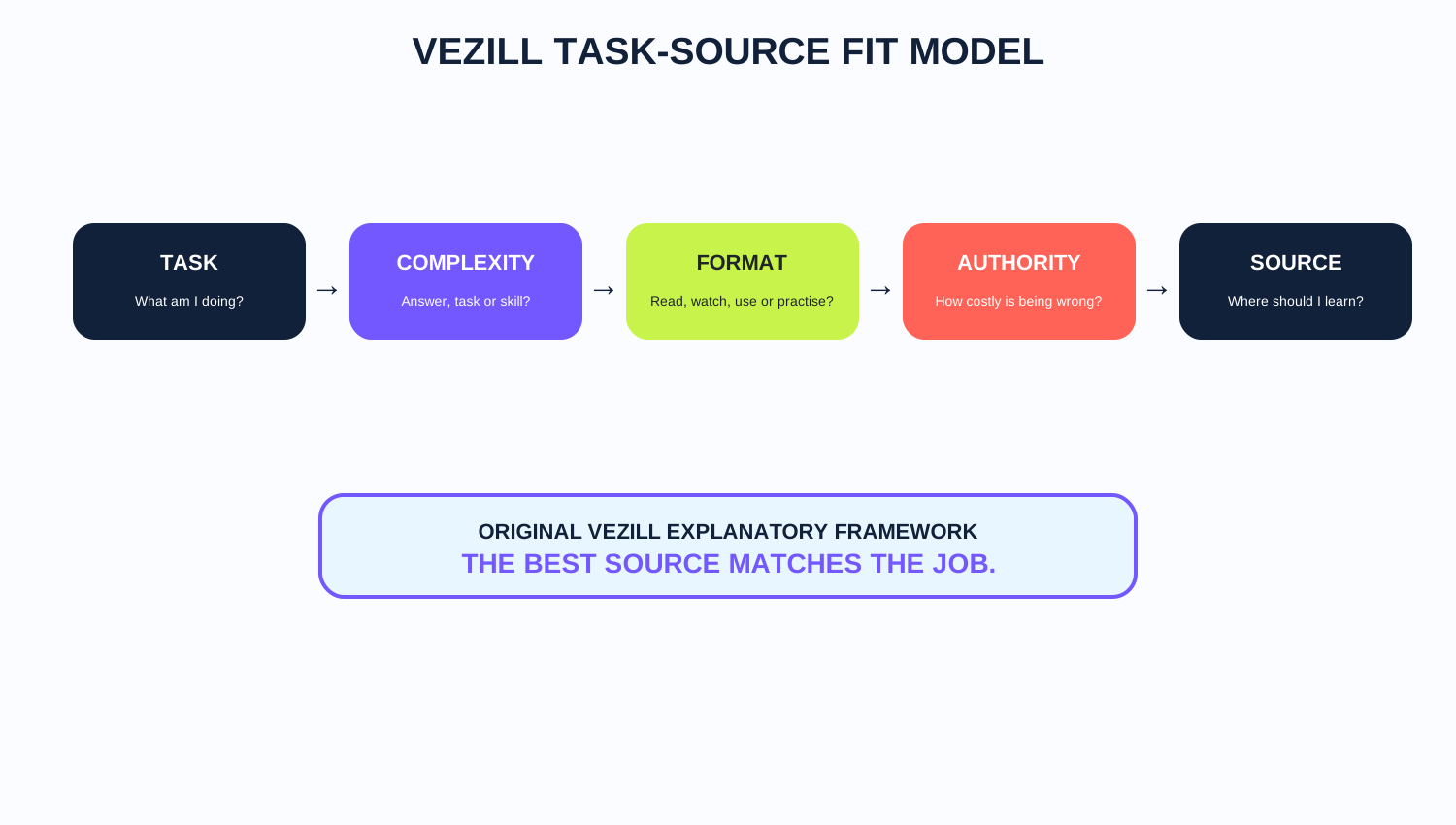 TASK → COMPLEXITY → FORMAT → AUTHORITY → SOURCE. Start with the job, then choose the learning destination.
Write the outcome in plain language. “Understand PivotTables” is broad. “Create a PivotTable that totals monthly sales by region” is much more actionable.
Is this one answer, a short procedure, a reusable skill or professional competence? The larger the capability, the more structure and practice you are likely to need.
A physical movement, visual design choice or software interface may be easier to learn from demonstration than text alone.
A wrong keyboard shortcut is annoying. Wrong medical, legal, financial, electrical or security guidance can cause serious harm. Raise the source standard as the consequence of error rises.
Sometimes an explanation is enough. Other times the missing piece is a checklist, spreadsheet, calculator, template, SOP, prompt system or toolkit.
MODEL TASK → COMPLEXITY → FORMAT → AUTHORITY → SOURCE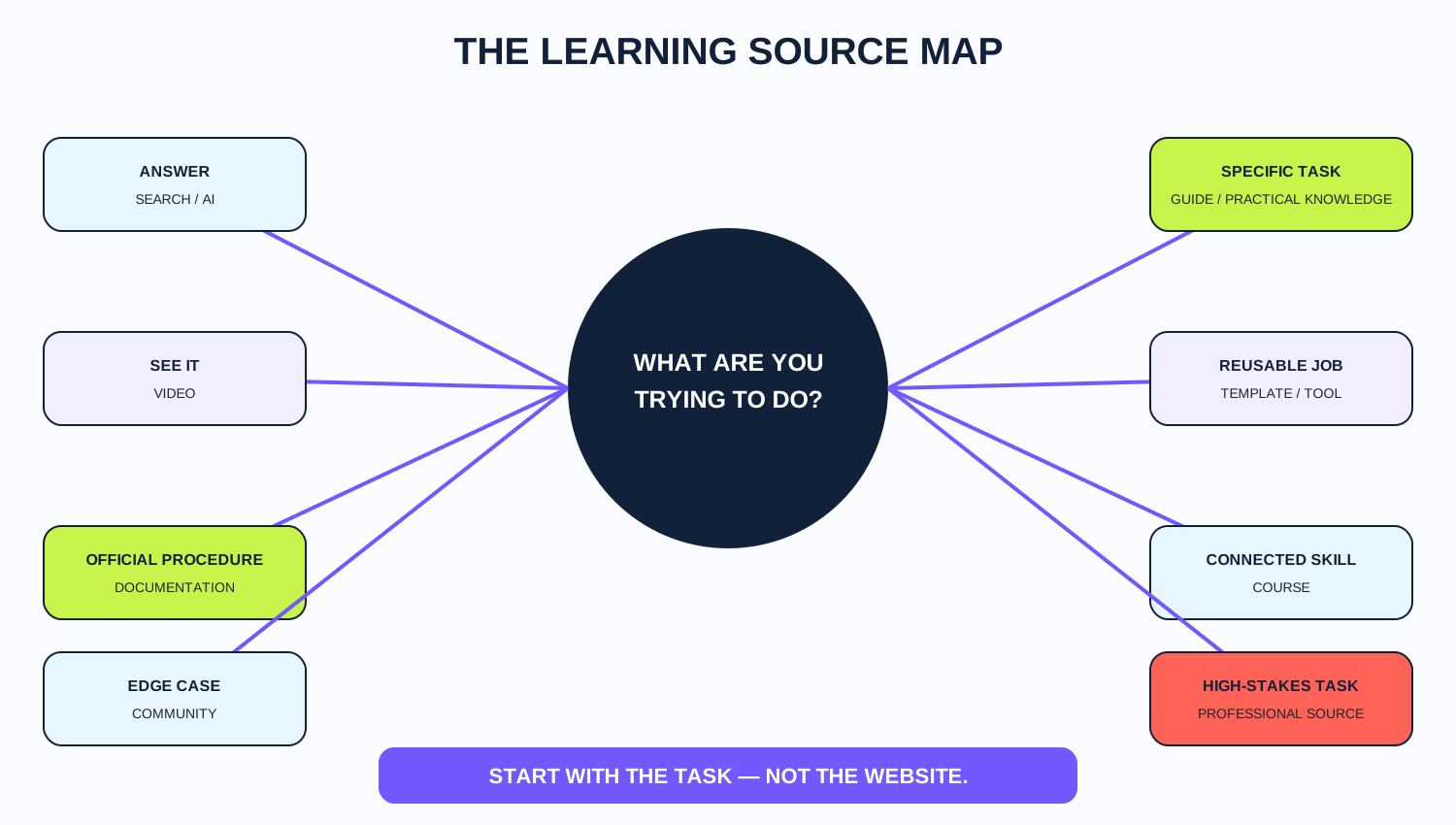 Answers, demonstrations, official procedures, edge cases, reusable tools and professional tasks naturally point toward different source types.
Search engines are strong starting points when you need to discover sources, compare approaches, locate official documentation or find niche instructions. They are especially useful when you know the words that describe the problem but do not yet know who has the best answer.
Their weakness is also their strength: search gives you options. You still have to judge which option deserves your attention. A search result can lead to an authoritative manual, an outdated tutorial, a sales page or a useful community answer. The ranking itself does not eliminate the need to evaluate the source.
SEARCH SEARCH IS EXCELLENT AT FINDING INFORMATION. YOU STILL HAVE TO DECIDE WHICH INFORMATION DESERVES YOUR ATTENTION.AI assistants are useful when you want to ask follow-up questions, simplify an explanation, troubleshoot interactively, generate examples, adapt instructions to your context or turn a vague problem into a clearer sequence. Modern AI search also blends conversational answers with web sources, which can reduce the effort of opening and comparing many pages.
That convenience does not make verification optional. Current ChatGPT search guidance, for example, explicitly tells users that search results and citations can be incomplete, outdated or incorrect and recommends checking cited sources and using authoritative sources when accuracy matters. Google Search has likewise continued moving toward conversational follow-ups in AI Mode, where context can carry across a search conversation.
AI AI CAN MAKE KNOWLEDGE INTERACTIVE. IT DOES NOT MAKE VERIFICATION OPTIONAL.A useful mental model is QUESTION → ANSWER → FOLLOW-UP → CONTEXT → REFINED ANSWER. This can be faster than repeatedly rewriting search queries, but the final instruction still needs an appropriate source standard.
When you need the official procedure, specification, policy or current product behavior, documentation from the organization responsible for the system is often the best starting point. Microsoft’s current PivotTable support page, for example, distinguishes instructions across Excel platforms and versions and provides the actual sequence for creating a PivotTable. That kind of version-specific detail matters.
Official documentation is especially important for software tools, APIs, government procedures, tax rules, platform policies and regulated processes. Its limitation is usability: official docs may assume prior knowledge, use technical terminology or explain features rather than your exact real-world workflow. A practical guide can sometimes bridge that gap—but should not contradict the authoritative source.
OFFICIAL SOURCE WHEN THE QUESTION IS “WHAT DOES THIS SYSTEM OFFICIALLY SUPPORT?”, GO TO THE SOURCE.Video becomes especially valuable when movement, timing, interface navigation, visual comparison or physical technique matters. Cooking, design software, woodworking, hair styling, equipment setup and many software workflows can be easier to understand when you can see the action happen.
But video is not automatically better. A 30-minute recording can bury a two-minute procedure. Interfaces can become outdated. Prerequisites may be hidden. A creator can demonstrate what worked in one context without explaining why. Use video because the task benefits from demonstration—not simply because video exists.
VIDEO VIDEO IS POWERFUL WHEN YOU NEED TO SEE THE ACTION — NOT SIMPLY BECAUSE VIDEO EXISTS.Communities are valuable when the problem is unusual: a specific error message, an obscure hardware combination, a rare software conflict or a situation where you want to compare how several people approached the same issue. They expose you to experience that formal documentation may not cover.
The trade-off is consistency. Popularity does not equal correctness. Old answers may survive long after a product changes. The person answering may have different assumptions from yours. For consequential decisions, use community experience as evidence to investigate—not as automatic authority.
Courses are appropriate when the subject is larger than one task: connected concepts, progression, deliberate practice, foundations and repeated use. If you only need one PivotTable, a focused tutorial may be enough. If you want to become competent in Excel, you need more than one successful PivotTable.
This is the same depth decision explored in Quick Knowledge vs Online Courses: Which Do You Actually Need?. The point is not that short learning is always better. A course is not too long when the skill itself is large.
Sometimes the thing you need is not another answer. You need a guide, spreadsheet, checklist, template, prompt system, calculator, tutorial or toolkit that someone has already organized around a task. This is where the practical-knowledge marketplace model becomes useful.
VEZILL’s current About page describes a creator journey of KNOW → PACKAGE → SELL and a buyer journey of FIND → APPLY → RESULT. The platform lists formats such as guides, templates, spreadsheets, prompts, checklists, tutorials, micro-courses and toolkits.
QUICK KNOWLEDGE YOU DO NOT ALWAYS NEED TO LEARN THE WHOLE SUBJECT. SOMETIMES YOU NEED THE KNOWLEDGE REQUIRED FOR THE TASK IN FRONT OF YOU. Need a guide, template, spreadsheet, tutorial or toolkit? Explore VEZILL. FIND PRACTICAL KNOWLEDGE ON VEZILL →Some tasks should not be learned from generic internet content alone. Medical treatment, legal procedures, electrical repair, advanced cybersecurity, structural engineering, regulated financial decisions, aviation and hazardous equipment can involve consequences that exceed the convenience of a quick tutorial.
In those cases, use the appropriate official, licensed, accredited or professional source and recognize when supervised training is required. A generic how-to article should not pretend to replace qualified professional judgment.
HIGH-STAKES RULE THE HIGHER THE CONSEQUENCE OF ERROR, THE HIGHER THE STANDARD OF SOURCE AND VERIFICATION SHOULD BE.Another way to choose a website is to ask how much learning depth the task actually requires. The VEZILL Learning Source Ladder below is an editorial framework for matching the size of the resource to the size of the need.
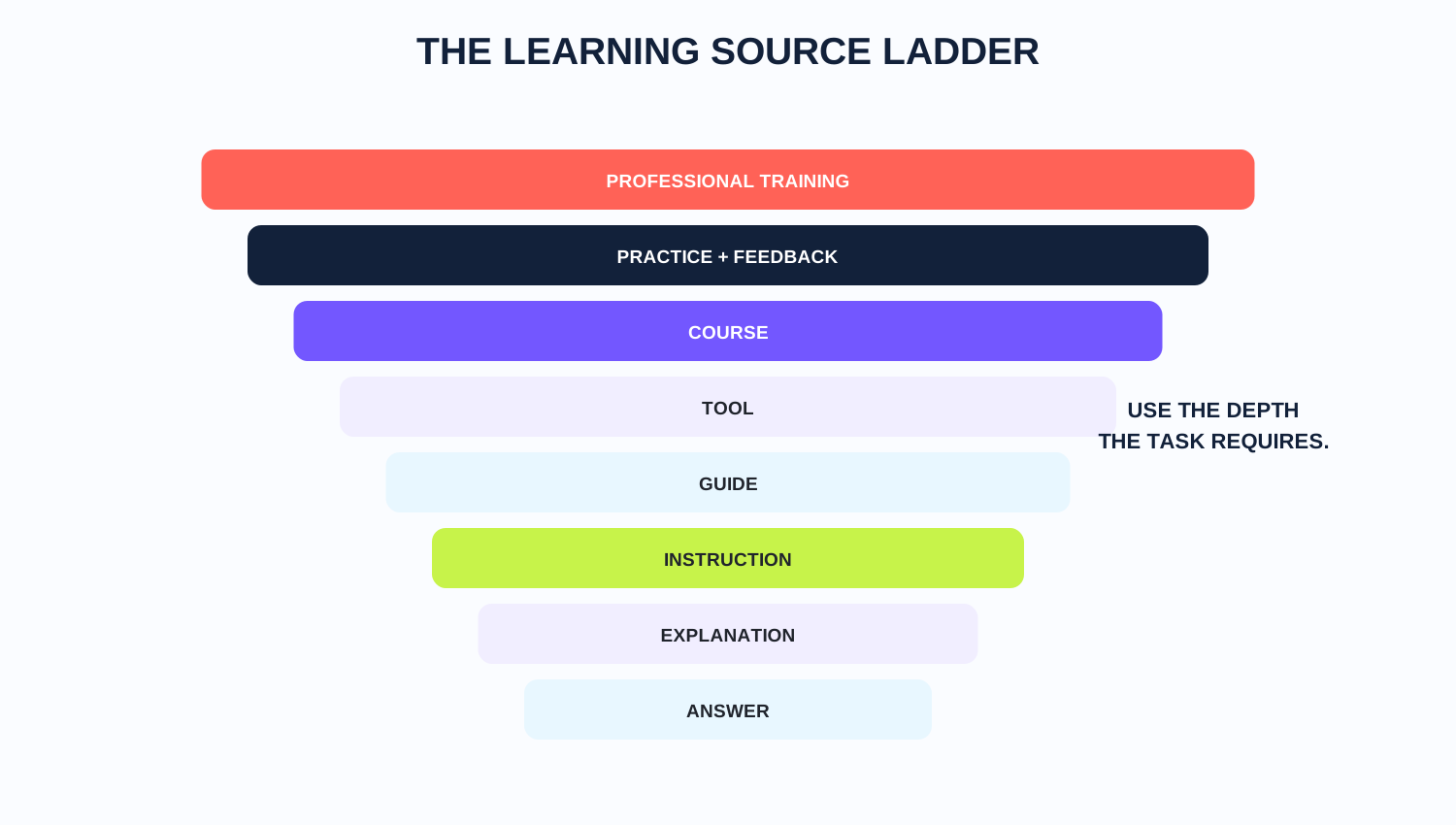 Do not use professional-training depth for a simple explanation, and do not use a simple answer when the task requires professional competence.
A fact, definition or direct response.
Enough context to understand the idea.
A small sequence for performing one action.
A bounded task with steps, context and checkpoints.
A reusable template, spreadsheet, checklist or system.
Connected concepts and structured progression.
Repeated performance with correction and refinement.
Formal or supervised competence where standards and consequences justify it.
DEPTH MATCH DO NOT USE LEVEL 8 WHEN LEVEL 2 SOLVES THE PROBLEM. DO NOT USE LEVEL 2 WHEN THE TASK REQUIRES LEVEL 8.| Need | Best Starting Source | Why | Main Risk |
|---|---|---|---|
| Simple definition | Search / AI | Fast orientation | Oversimplification |
| Official software setting | Official documentation | Authoritative and version-specific | Technical language |
| Physical demonstration | Video | You can see the action | Outdated or incomplete demonstration |
| Strange error | Community | Edge cases and lived experience | Incorrect or stale advice |
| Specific task | Guide / practical knowledge | Focused sequence | Quality varies |
| Reusable structure | Template / tool | Saves setup and repetition | Compatibility or hidden logic |
| Connected skill | Course | Progression and foundations | Overkill for one task |
| Professional capability | Accredited / professional source | Standards and supervised depth | More time and cost |
Notice that the table says “best starting source,” not “only source.” A software problem may begin with documentation and end with a community workaround. A course may use video, examples and templates. A practical guide may point back to official rules. Good learning often combines sources while keeping their roles clear.
The most useful first step is the same one developed in What Are You Trying to Do? How to Find Practical Knowledge Online: describe the result before choosing the content.
1. Define Write: “I am trying to ______.” 2. Classify Do I need an answer, instructions, a tool or a skill? 3. Choose Select the source category that fits that need. 4. Verify Check authority, freshness, context and limitations. 5. Apply Perform one meaningful step rather than collecting more tabs. 6. Check Verify whether the result actually worked. STARTING FLOW DEFINE → CHOOSE → VERIFY → APPLY → CHECKBefore following a how-to website, guide or tutorial, run a quick quality check. This is an original VEZILL editorial checklist, not a formal certification system.
1. RELEVANCE Does it solve my exact problem? 2. AUTHORITY Why should I trust this source? 3. FRESHNESS Is it current enough? 4. CONTEXT Does it match my tool, version or situation? 5. CLARITY Can I follow it? 6. SEQUENCE Are the steps in a sensible order? 7. EXAMPLES Does it show what correct execution looks like? 8. CHECKPOINTS Can I verify progress? 9. LIMITATIONS Does it explain boundaries and exceptions? 10. RESULT Can I confirm success? QUALITY THE BEST HOW-TO WEBSITE IS NOT THE ONE WITH THE MOST CONTENT. IT IS THE ONE THAT HELPS YOU FIND THE RIGHT CONTENT FOR THE TASK.Search works best when you can name the exact question: “How do I calculate gross margin?” Browsing becomes useful when you know the broader goal but do not yet know what resource would help: “I need to improve how I manage my small business.”
That distinction is relevant to a practical knowledge marketplace. VEZILL’s public About page currently organizes possibilities around action-oriented ideas such as making, building, starting, fixing, growing, creating, calculating, learning, improving and automating. The goal is to move discovery closer to what the person is trying to do.
If the answer turns out to be a bounded procedure, Where Can I Find Step-by-Step Guides for Things I Want to Do? goes deeper into evaluating step-by-step resources.
The table below is intentionally nuanced. It recommends a starting source, not a universal destination. “Escalate” means move to a more authoritative, deeper or supervised source when the task exceeds the initial resource.
| What Someone Wants to Do | Best Starting Source | Why | When to Escalate |
|---|---|---|---|
| Create an invoice | Template + official requirements | Fast reusable structure | Legal/tax requirements differ |
| Build an Excel PivotTable | Microsoft docs + focused tutorial | Version-specific steps | Complex data models |
| Connect a domain | Registrar/host documentation | Settings are provider-specific | DNS/security uncertainty |
| Cook biryani | Recipe + video | Measurements plus visual cues | Allergies/food safety |
| Fix a leaking tap | Guide + video | Visual sequence | Major plumbing damage |
| Write a CV | Guide + template | Structure and examples | Role-specific requirements |
| Calculate profit | Guide + spreadsheet | Formula plus reusable tool | Accounting complexity |
| Build a monthly budget | Spreadsheet + guide | Reusable structure | Complex household/business finances |
| Resize an image | Tool documentation/tutorial | Simple bounded task | Print/color requirements |
| Remove duplicate rows | Official spreadsheet docs | Exact software procedure | Large/critical datasets |
| Set up Google Analytics | Official docs | Current product setup | Complex tracking/privacy |
| Create a presentation | Template + guide | Reusable design structure | High-stakes pitch |
| Use Canva | Official help + tutorial | Current interface | Advanced design needs |
| Create social-media calendar | Template + guide | Planning structure | Multi-team workflow |
| Prepare for an interview | Guide + practice | Examples plus rehearsal | Specialist assessment |
| Learn Python | Structured course + practice | Connected capability | Professional specialization |
| Debug one Python error | Docs + community + AI | Specific troubleshooting | Security/production impact |
| Build a website | Guide/course + docs | Multi-step capability | Security/payment systems |
| Understand SEO | Guide/course | Connected concepts | Major site migration |
| Run an SEO audit | Checklist + tools | Repeatable workflow | Technical enterprise SEO |
| Create email sequence | Template + guide | Reusable structure | Legal/compliance issues |
| Create customer-service SOP | SOP template + examples | Standardizes process | Regulated industries |
| Design a logo | Design guide + examples | Principles and process | Trademark/legal checks |
| Edit a video | Video tutorial + course | Visual workflow | Professional production |
| Learn photography | Course + practice | Technique needs repetition | Commercial specialization |
| Configure WordPress | Official docs + guide | Product-specific steps | Security/server issues |
| Back up a phone | Manufacturer docs | Device-specific | Data loss/recovery |
| Transfer files | Official docs | Platform-specific | Sensitive data |
| Plan a wedding | Checklist + planner | Many recurring tasks | Legal/vendor contracts |
| Track poultry records | Spreadsheet + local guide | Reusable records | Veterinary/health issues |
| Scale a recipe | Calculator + guide | Fast arithmetic | Commercial food safety |
| Create business plan | Template + guide | Organizes thinking | Investor/legal complexity |
| Price freelance service | Framework + calculator | Decision structure | Tax/contract advice |
| Create proposal | Template + examples | Saves reinvention | Large procurement process |
| Learn bookkeeping | Course + practice | Connected skill | Statutory reporting |
| Calculate tax | Official tax authority + professional | Rules are jurisdictional | Ambiguity/high stakes |
| Repair electrical fault | Qualified professional source | Safety-critical | Use a professional |
| Understand medication instructions | Official leaflet/pharmacist/doctor | Health-critical | Any uncertainty |
| Learn cybersecurity | Structured labs/course | Practice and foundations | Live systems/legal boundaries |
| Fix a computer error | Docs + community | Specific troubleshooting | Data/security risk |
| Create AI prompts | Guide + experimentation | Iterative task | High-stakes outputs |
| Automate repetitive workflow | Tool docs + tutorial | Platform-specific sequence | Sensitive data/production |
| Build project tracker | Template + guide | Reusable structure | Complex team integrations |
| Learn Power BI | Course + official docs | Connected capability | Enterprise governance |
| Make a dashboard | Worked example + tool | Concrete pattern | Critical business decisions |
| Design ecommerce listing | Checklist + platform docs | Task-focused | Regulated product claims |
| Create content plan | Framework + template | Reusable planning | Large brand governance |
| Learn public speaking | Course + practice/feedback | Performance skill | High-stakes professional event |
| Prepare client onboarding | Checklist + SOP | Repeatable workflow | Legal/data requirements |
| Research a business idea | Research framework + primary sources | Organizes evidence | Investment/legal decisions |
For Kenyan users, the same source-fit principle applies, but local context can matter more for taxes, government services, M-PESA workflows, business registration, local agriculture, employment requirements and curriculum-specific learning. A globally excellent guide can still be the wrong guide if it assumes another country’s law, currency, payment system or public service.
KENYA PRINCIPLE OFFICIAL SOURCE FOR THE RULES. PRACTICAL KNOWLEDGE FOR HELP APPLYING THEM.For KRA procedures or tax obligations, begin with the responsible official source or qualified professional guidance. For an M-PESA business process, check current Safaricom documentation where the product rules matter. For the supporting task—such as organizing records, building a tracker or understanding a workflow—a practical guide or template may help translate the requirement into action.
The same logic applies across Africa, but “Africa” is not one operating context. Regulations, payment systems, curricula, languages and business practices differ by country. Localize only the parts that actually depend on location; a Python concept or Excel formula may be broadly transferable, while a tax calculator may not be.
The classic web-learning path was often SEARCH → WEBSITE → READ. AI search increasingly supports a different interaction: ASK → ANSWER → SOURCES → FOLLOW-UP → ACTION. In 2026, Google announced broader conversational continuity from AI Overviews into AI Mode, while ChatGPT search already supports web-backed answers and follow-up questions in conversational context.
This does not make websites irrelevant. Reliable answers still need sources, evidence, documentation, original expertise, tools, products and deeper context. AI may become an interface over more of the web, but useful knowledge still has to be created, maintained and made discoverable somewhere.
AI + WEB AI MAY CHANGE HOW WE REACH KNOWLEDGE. IT DOES NOT REMOVE THE NEED FOR RELIABLE KNOWLEDGE TO EXIST SOMEWHERE.This matters for practical learning because the destination may become less important than the knowledge object. A user may begin with an AI question, follow a source to official documentation, discover a focused guide, use a template and then return to AI for troubleshooting. The learning journey becomes a chain rather than a single website visit.
Search engines historically optimized the journey from a query toward documents. AI-mediated systems increasingly try to help users move from a goal toward an answer, source, tool or action. A useful shorthand is QUERY → DOCUMENT versus GOAL → KNOWLEDGE → ACTION.
That does not mean search engines have stopped showing documents, nor that every AI system is a “knowledge engine.” It is a conceptual shift in user expectation: people increasingly want systems to help interpret the question, narrow the information and support the next step.
Structured practical knowledge fits naturally into that environment because it is already organized around tasks and outcomes. A checklist has explicit steps. A spreadsheet encodes a repeatable calculation. A guide can expose prerequisites and checkpoints. A template turns an abstract pattern into something reusable.
VEZILL does not need to replace search engines, video, AI, official documentation, courses or professional training. Each of those solves a different part of the learning problem. VEZILL’s opportunity is narrower and more useful: occupy the layer between “I need to know how” and “someone has already packaged useful knowledge for this task.”
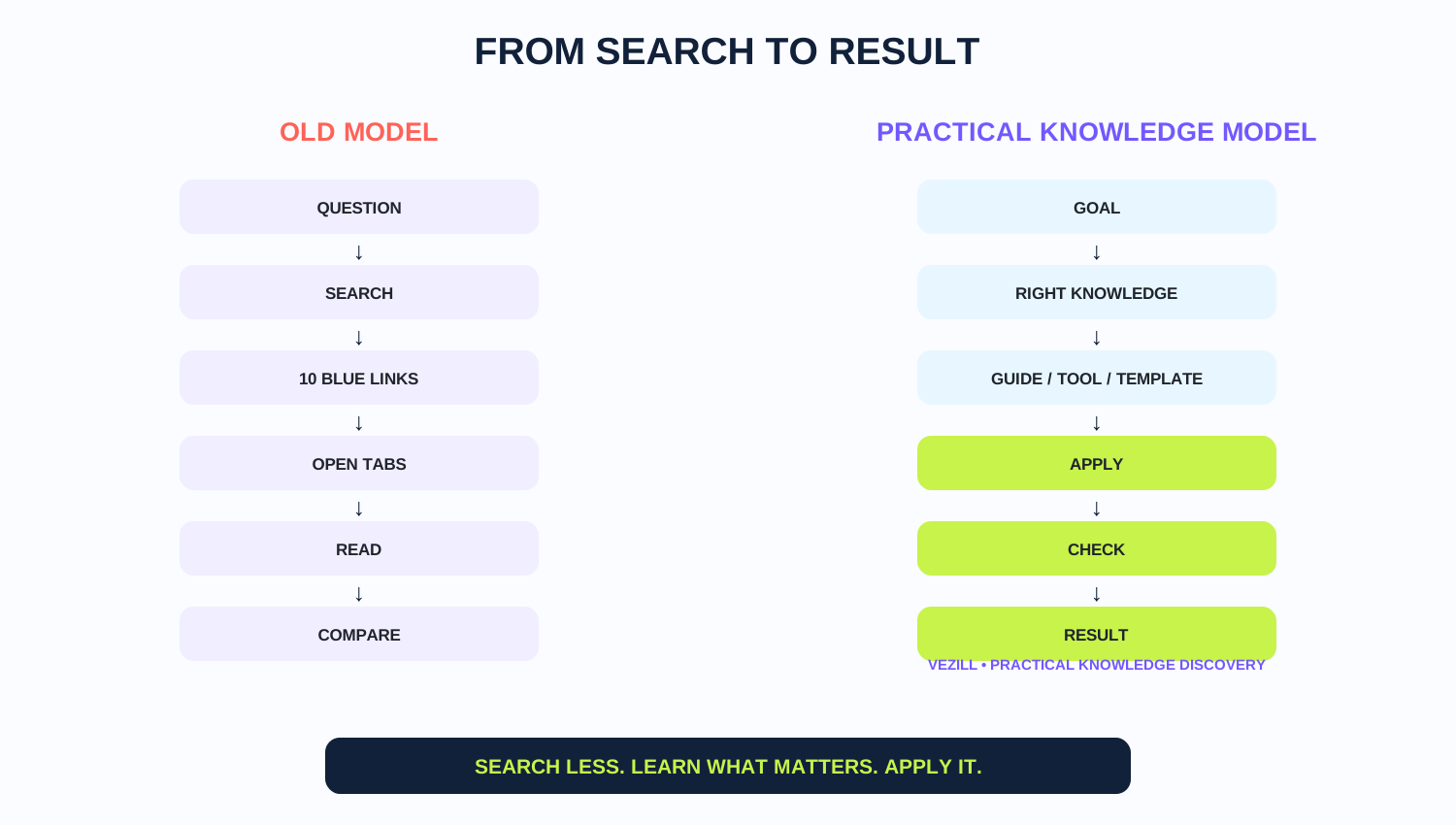 The practical-knowledge path shortens the distance between a goal and a usable guide, tool or template, while verification still depends on the task.
The platform’s current public positioning supports that model: its About page describes knowledge being researched, organized, tested, simplified and packaged, while its FAQ emphasizes focused practical information for a task, problem or outcome.
POSITIONING VEZILL DOES NOT NEED TO CONTAIN EVERYTHING ABOUT A SUBJECT. IT NEEDS TO HELP PEOPLE FIND USEFUL KNOWLEDGE FOR WHAT THEY ARE TRYING TO DO. WHAT ARE YOU TRYING TO DO? Find practical knowledge on VEZILL. FIND PRACTICAL KNOWLEDGE ON VEZILL →A web page can explain. A video can demonstrate. AI can interact. A guide can structure. A template can save setup. None of those automatically creates professional competence. Some capabilities require supervised practice, feedback, licensing, formal assessment, access to real equipment or responsibility under professional standards.
Use the smallest resource that responsibly solves the problem—but no smaller. This protects against two opposite mistakes: taking a massive course for a tiny task, and treating a five-minute tutorial as a substitute for competence in a high-stakes field.
These visible steps match the HowTo structured data embedded in this article.
There is no single best website for every task. Use search or AI for quick orientation, official documentation for authoritative procedures, video when seeing matters, practical guides and tools for bounded tasks, courses for connected skills, and professional sources for high-stakes work.
You can learn through search engines, AI assistants, official documentation, video tutorials, community Q&A, structured courses and practical knowledge marketplaces such as VEZILL.
The best how-to source is the one that matches the task, version, context and consequence of error. Evaluate relevance, authority, freshness, clarity, examples and whether you can verify the result.
Search for the exact task, check official documentation where applicable, or browse practical knowledge marketplaces such as VEZILL for task-focused guides and related resources.
Video can be excellent when movement, interface navigation or visual technique matters. Check the date, version, creator credibility and whether the demonstration matches your context.
They are useful in different ways. AI can provide conversational explanations and follow-ups; search is strong for discovering and comparing sources. For important facts or procedures, verify against authoritative sources.
Use official documentation when you need current product behavior, specifications, platform policies, government procedures or other information controlled by the organization responsible for the system.
Check who created it, whether the information is current, whether claims can be verified, whether it matches your context, and whether it acknowledges limitations and safety boundaries.
Use a focused guide for a bounded task. Use a course when you need connected concepts, progression, practice and broader capability.
Practical knowledge marketplaces such as VEZILL can contain templates, spreadsheets, calculators, checklists, prompts, tutorials and toolkits depending on available listings.
It is a marketplace where useful know-how is packaged into digital resources organized around tasks, problems, processes or outcomes.
VEZILL describes itself as a global digital knowledge marketplace connecting people who know how with people who need to know how.
The web gives us more learning options than any single person could use. Search can find. AI can explain and interact. Video can demonstrate. Communities can expose edge cases. Official sources can define rules and current product behavior. Courses can build connected capability. Professional training can provide the depth and accountability that high-stakes work requires.
The mistake is treating those sources as interchangeable. The better habit is to define the task first, choose the appropriate depth and format, raise the standard of authority when the consequence of error rises, and verify the result after applying what you learned.
For bounded practical tasks, there is another possibility: the useful knowledge may already be packaged as a guide, template, spreadsheet, checklist, tutorial or toolkit. That is the space VEZILL is building around.
FINAL PRINCIPLE START WITH THE TASK — NOT THE WEBSITE.Discover more articles you might be interested in

how to sell digital products without a large social media following
By Davie

A practical expertise-to-product workflow for extracting what you genuinely know, connecting it to a real problem, packaging it into a useful digital product, validating demand and using AI without inventing proof.
By Davie

how to turn your experience into a digital product
By Davie

Turn What You Know Into Practical Knowledge
By Davie
Get the updates, on newly released, popular & fast-moving MRR digital products
Up to Top
Comments All
Patricia
@patricia
Finding the right website can make learning something new so much easier. There are so many options online, so having a list of useful places to start is really helpful.
September 17,2026 At 05:58 PM